Developers (API keys and webhooks)
The Developers page of the portal: the API keys, Webhooks and Docs tabs, every field of the key and endpoint forms, and what each button changes.
On this page
Connect your own systems (an ERP, a web shop, a script) to your courier: place and track orders by API and get order updates by webhook. Open Developers from your account menu; it is listed for the primary contact only. Keys and webhooks act for your whole company, so only the primary contact manages them; anyone else who opens the page sees Only your primary contact can manage this on those tabs and can read Docs. For the task step by step, see Connect your systems with API keys and webhooks.
At a glance
| Tab | What it does |
|---|---|
| API keys | Create, rotate and revoke the keys your systems sign in with |
| Webhooks | The URLs that receive order and invoice events |
| Docs | How to use the API and check webhook signatures |
API keys
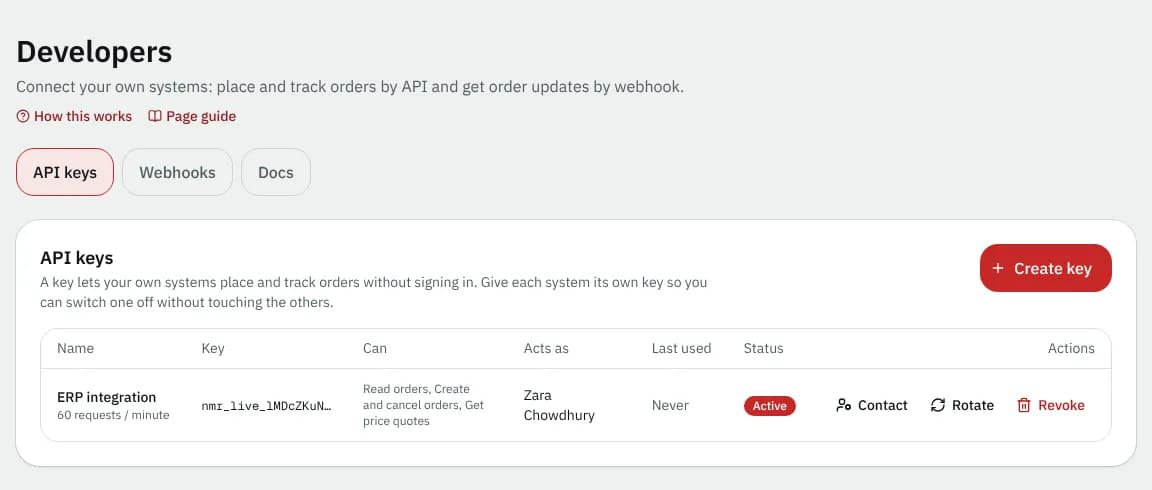
Create key (or Create your first key) opens Create an API key:
| Field | What to enter | Required | Notes |
|---|---|---|---|
| Name | e.g. "ERP integration" | Yes | Up to 60 characters |
| What can this key do? | Read orders, Create and cancel orders, Get price quotes | At least one | |
| Speed limit | 30, 60, 120, 600 or 3000 requests per minute | Yes | 60 by default. Your courier's plan must include API access. Above it, requests are refused with a 429 error until the minute is over. |
After Create key, Your new API key shows the key once. Copy it and store it safely: only a fingerprint is kept, so it can't be shown again.
The key list
| Column | Shows |
|---|---|
| Name | The name and its speed limit |
| Key | The first characters of the key |
| Can | Its permissions |
| Acts as | The contact the key works as. Not active: requests are refused. Change the contact. when that person lost access. |
| Last used | When it was last used, or Never |
| Status | Active, Expiring (with when it stops), Expired or Revoked |
| Button | What it does |
|---|---|
| Contact | Changes which contact the key acts as. The key can do no more than that contact can in the portal; the key itself stays the same. |
| Rotate | Create replacement key gives a new key with the same permissions. The old one keeps working for 24 hours, then stops. |
| Revoke | Revoke key stops the key at once; its requests are refused with a 401 error. Can't be undone. |
Webhooks
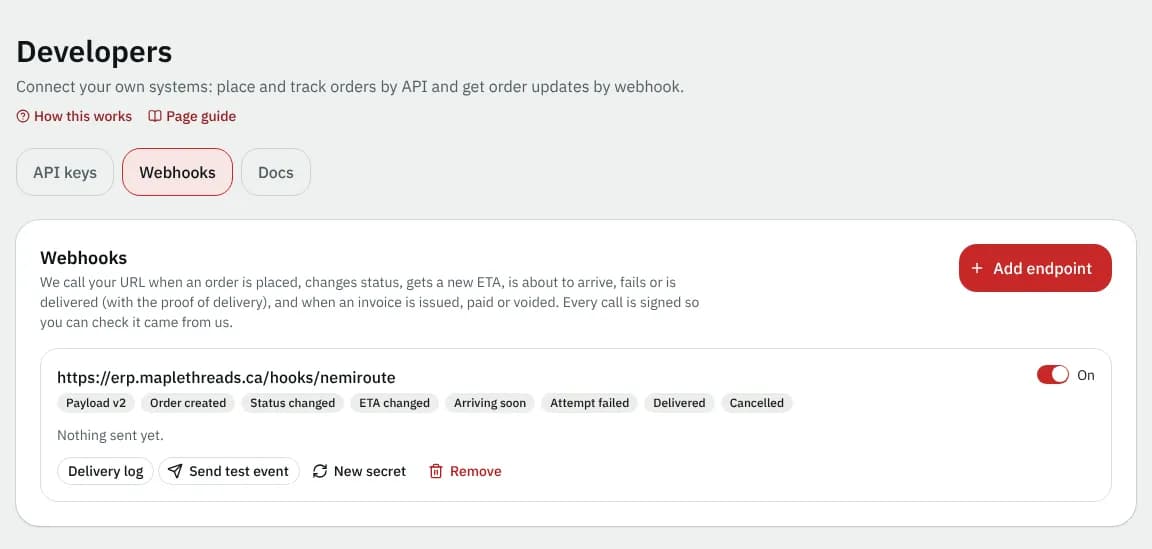
Add endpoint (or Add your first endpoint) opens Add a webhook endpoint:
| Field | What to enter | Required |
|---|---|---|
| URL | a full address, like https://example.com/hooks | Yes |
| Send me: orders | Order created, Status changed, ETA changed (set or moved by 5 minutes or more), Arriving soon, Attempt failed, Delivered, Cancelled. All start ticked. | At least one event |
| Send me: invoices | Invoice issued, Invoice paid, Invoice overdue, Invoice voided (when you can view invoices) |
Each call is a signed POST with JSON; your server should answer with any 2xx status within 10 seconds. After saving, Your signing secret is shown once.
Each endpoint
| Control | What it does |
|---|---|
| On / Off | Pauses or resumes sending without removing the endpoint |
| Payload badge | Payload v2, or Payload v1 (legacy) for older endpoints |
| Send test event | Sends a sample call and opens the log |
| Delivery log | The last 50 attempts, each as Delivered, Waiting, Retrying or Gave up, with Replay. A failed call is retried after 1 minute, 5 minutes, 30 minutes, 2 hours and 6 hours. |
| Switch to v2 | Moves a legacy endpoint to the full payload and all events |
| New secret | Create new secret: for 24 hours every call carries two signatures (new and old secret), then only the new one; update your system within that time |
| Remove | Remove endpoint: stops sending; events still being retried are dropped |
If your courier's plan does not include API access, you cannot add an endpoint or change its URL, events or payload version. An endpoint you already have keeps delivering, and you can still switch it off, test it, change its secret or delete it.
Docs
API documentation walks through: sending your key in the Authorization header, getting a price (also for an address that isn't in your address book), placing an order with an Idempotency-Key, the PRICE_CHANGED answer, reading, listing and cancelling orders, labels and proofs of delivery, your address book, permissions, limits and errors, the webhook payload and checking the NemiRoute-Signature header. OpenAPI document downloads the machine-readable description for Postman or code generators.
Good to know
- Give each system its own key, so you can switch one off without touching the others.
- A revoked, expired or unknown key gets a 401 error.
Related articles
- How-toConnect your systems with API keys and webhooksCreate API keys so your own software can place and track orders, and webhooks so it hears about new orders and status changes.
- How-toImport orders from a spreadsheetPlace many orders at once from a CSV or Excel file, match its columns, fix rows with problems and undo an import if needed.
Still stuck?
Ask your courier company: they can see your account. Or tell us what you were trying to do.