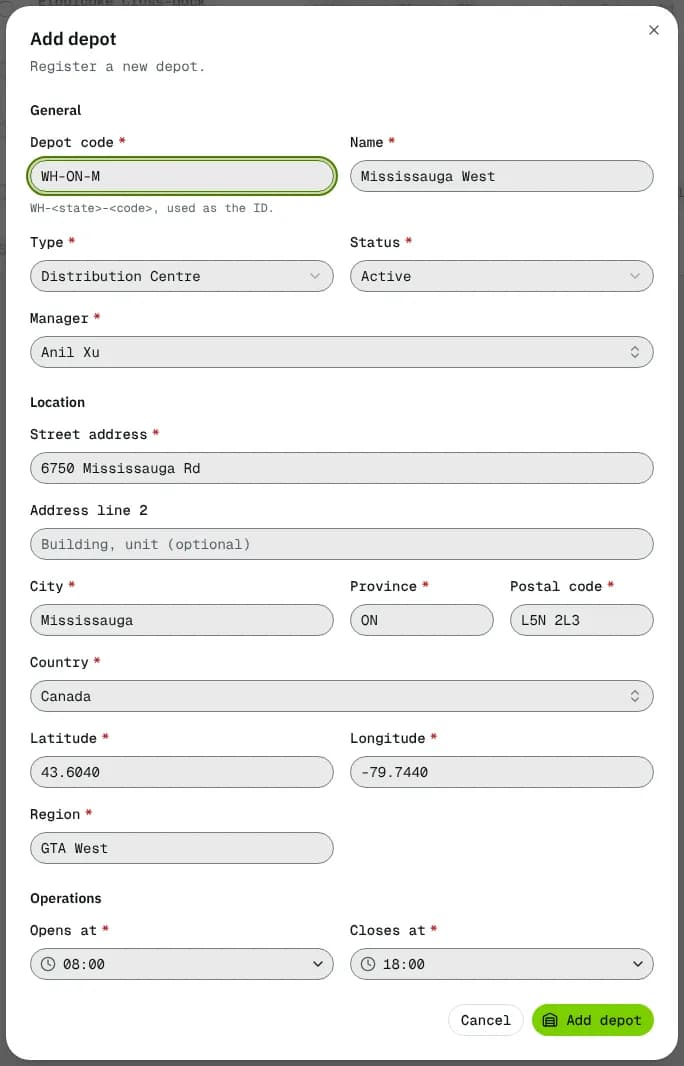
Every column, filter and action on the Depots list, and every field of the Add depot and Edit depot form.
3 min readLast updated
On this page
Depots lists the places your vehicles leave from and goods are received at: hubs, distribution centres, cross-docks. Every route starts at a depot, and a driver or vehicle can have a home depot. Anyone with read access to depots can open it (every built-in role except Finance). Adding a depot needs create access (Admin and Warehouse Manager by default), editing needs write access (the same two roles), deleting needs delete access (Admin only). Open it from Depots in the sidebar.
At a glance
Area
What it shows / does
Add depot (header)
Opens the add form. Hidden without create access.
Toolbar
Search depots..., All statuses, All locations, column choice and Export.
Depots table
One row per depot, with tick boxes. Click a row to open the depot.
⋯ on a row
View details, Edit depot, Delete.
Search, filters and export
Search depots... finds a depot by name, code or city.
All statuses: Active, Inactive, Maintenance.
All locations: the Region values of your depots (for example "GTA West").
Export downloads a CSV. With depots ticked it exports only those (the toolbar shows how many are selected, with Clear); otherwise every depot that matches the filters.
The table
Column
What it shows
Depot
Name (opens it) with the code under it. Sortable.
Location
City and province / state.
Manager
The user who manages it.
Status
Active, Inactive or Maintenance.
Row actions
Action
Who
What it does
View details
Everyone
Opens the depot page.
Edit depot
Write access
Opens the edit form.
Delete
Delete access
Asks for confirmation, then deletes. A depot used by vehicles, drivers, users or orders can't be deleted: set it to Inactive instead.
Add depot / Edit depot form
General
Field
What to enter
Required
Notes
Depot code
WH- + a two-letter province or state + up to three letters or digits, for example WH-ON-T.
Yes (add only)
Used as the depot's ID in links. Can't be changed later. Must not be used before.
Name
For example "Mississauga Hub".
Yes
2–60 characters. Must be unique.
Type
Distribution Centre, Hub, Fulfillment Centre or Cross-dock.
Yes
A label only; it doesn't change how the depot works.
Status
Active, Inactive or Maintenance.
Yes
New depots start Active. Only active depots can start routes.
Manager
An active user.
Yes
Search by name.
Location
Field
What to enter
Required
Notes
Street address
For example "6300 Kennedy Rd".
Yes
Address line 2
Building, unit.
No
City
For example "Mississauga".
Yes
Province
For example ON.
Yes
Called State for the US.
Postal code
For example L5T 2X5.
Yes
Called ZIP code for the US.
Country
Yes
Defaults to your company's country.
Latitude, Longitude
The depot's map position in decimal degrees, for example 43.6532 and -79.3832.
Yes
Latitude −90 to 90, longitude −180 to 180. Routes are drawn and timed from this point, so check it.
Region
Your own grouping, for example "GTA West".
Yes
Up to 40 characters. Feeds the All locations filter.
Operations
Field
What to enter
Required
Opens at
Opening time, for example 07:00.
Yes
Closes at
Closing time, for example 19:00.
Yes
The hours are shown on the depot's Details tab as one daily window.
Click Add depot (the new depot opens) or Save changes. Errors show next to the field; "Couldn't save" shows anything else.
Statuses
Status
Meaning
What happens next
Active
In use.
Routes can start here.
Inactive
Not used any more.
Not offered as a route's start depot. Saving warns if open orders still pick up here.
Maintenance
Temporarily closed.
Same as inactive for routes.
Empty and error states
No depots yet with Add depot when you have none: "Add your first depot to start dispatching orders from it."
If the list can't load, an error box with a retry button replaces it.
Good to know
Depots hold no capacity, bins or stock figures: the load a depot can send out comes from the vehicles based there (see the depot's Today tab).