Pay dispatchers and office staff
Pay team members a salary per pay period, logged hours and a rate for every order they handle, with tiers, bonuses and their own statements.
On this page
Payroll pays team members as well as drivers: a fixed salary, a rate per order they handle, an hourly rate for logged hours. Team members without a staff plan (a salaried manager, say) are not paid through payroll. Staff pay is for the Finance and Admin roles.
Create a staff plan
- Open Pay plans and click New staff plan.
- Fill the Name and Effective from.
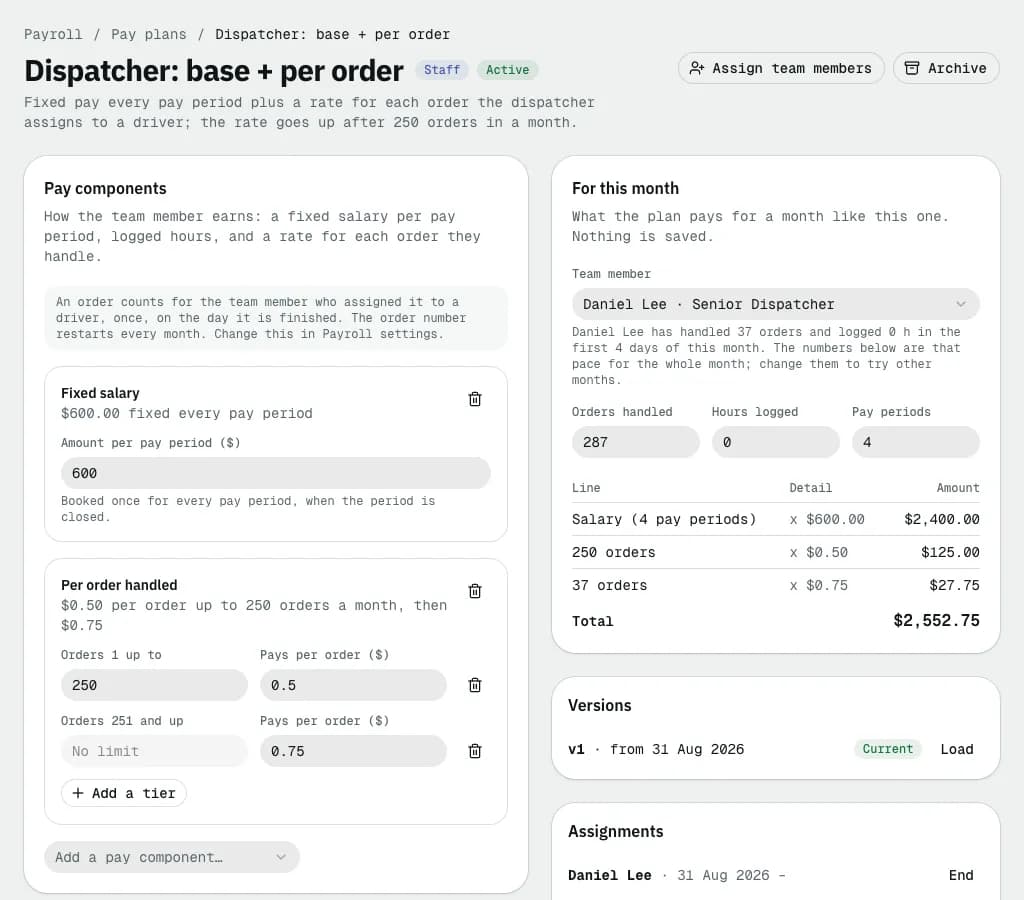
- Under Pay components, keep or remove Fixed salary (the Amount per pay period ($)) and Per order handled. Each row says in plain words what it pays, for example $0.50 per order up to 250 orders a month, then $0.75.
- For tiers, set Orders 1 up to and Pays per order ($); Add a tier for the next band. The last tier has no limit. The count starts again every month.
- Add Hourly (logged hours) for people paid by the hour.
- Under Bonuses, add a Bonus paid on Every order handled or on Reaching an order count this month.
- Click Create plan.
For this month on the right shows what the plan pays a real team member: pick them under Team member. Orders handled and Hours logged start at their pace so far, projected to the whole month; change them, or Pay periods, to try other months.
Assign it
- Open the plan and click Assign team members.
- Pick the Team member and Effective from, then click Assign. It replaces their earlier staff plan from that day.
The Team pay this month card on Payroll lists everyone on a plan with Orders handled, Hours and Earned so far, plus dispatchers who handle orders without a plan.
Which orders count
In Payroll settings, An order counts for the team member who… decides who gets each order:
| Choice | Who gets the order |
|---|---|
| Assigned it to a driver (default) | The last team member who assigned it. A reassignment moves it to whoever reassigned it. |
| Created the order | Whoever entered it. Portal, API and imported orders count for nobody. |
| Dispatched it | Whoever dispatched the route it went out on, otherwise whoever assigned it. |
| Was the dispatcher when it was delivered | Like the default, but returned orders don't count. |
An order counts once, on the day it is finished (delivered, completed or returned). Orders already booked keep their team member when you change the setting.
Hours, bonuses and deductions
- Log hours on Payroll or on an open pay period: pick the Team member, the Day and the Hours. They are paid at the plan's hourly rate. In the period, Details on the person lets you remove hours logged by mistake until the period is closed.
- A one-off bonus or deduction is an Adjustment on the pay period; pick the team member under Who.
- A regular allowance or deduction is a Recurring adjustment, the same as for drivers.
The salary is booked when the period is closed. Team members get a statement next to the drivers' (filter Staff in the period), are paid and exported the same way, and see their own pay under My pay.
Example: a dispatcher's month
A plan with Fixed salary $2,000.00 per pay period (monthly), Per order handled at $0.50 up to 250 orders then $0.75, Hourly (logged hours) $20.00 and a Bonus of $100.00 on Reaching an order count this month (280). In a month with 300 orders handled and 10 logged hours, For this month shows:
| Row | Calculation | Amount |
|---|---|---|
| Salary (1 pay period) | $2,000.00 | |
| 10 hours | 10 x $20.00 | $200.00 |
| 250 orders | 250 x $0.50 | $125.00 |
| 50 orders | 50 x $0.75 | $37.50 |
| Monthly target (280 orders) | paid once, on the 280th order | $100.00 |
| Total | $2,462.50 |
The tier follows the order's place in the month: order 251 is the first at $0.75, and the count starts again on the first of the next month.
Related articles
- How-toSee your own payYour staff pay plan, the orders you handled and what you earned this month, and your pay statements as PDFs.
- How-toRoute, outcome and conditional payPay drivers per stop, package or route, for failed attempts, returns and late cancellations, only under conditions, split between pickup and delivery drivers, and pass tips on in full.
- ConceptWorked examples - driver payReal numbers for pay plans: per delivery, per km, rush and wait time, percent of order, hourly with Ontario and British Columbia overtime, guarantees and floors, own-vehicle allowance, route pay, COD shortfall deductions and a contractor's statement with GST/HST.
Still stuck?
Tell us what you were trying to do. A person reads every message.