Set up driver pay plans
Build a pay plan from components and modifiers, pay different rates for own and company vehicles, try it in the simulator, assign it to groups of drivers and publish new versions.
Watch: Paying your drivers: a pay period
2:11Where pay comes from, how a week becomes statements, and how to review, adjust, approve and record the payment.
On this page
A pay plan says how drivers earn: per hour, per delivery, per km and so on. Plans are versioned: a change takes effect on a date and pay already earned is never recalculated. Payroll is for the Finance and Admin roles.
Create a plan
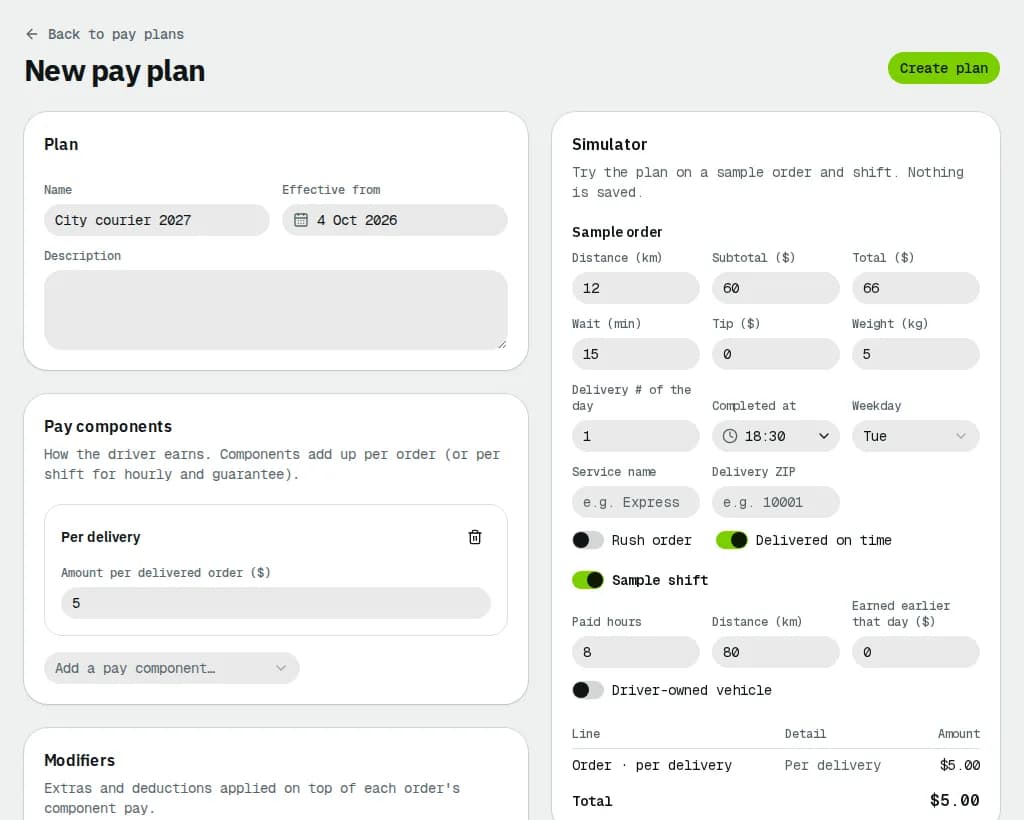
- Open Payroll, click Pay plans, then New driver plan (New staff plan is for dispatchers, see Pay dispatchers and office staff).
- Fill the Name, Effective from and an optional Description.
- Under Pay components, pick from Add a pay component…: Hourly, Per delivery, Per distance, Percent of order, Tiered, Zone / service rate, Minimum guarantee or Engaged-time floor. Fill the rates. Components add up per order, or per shift for hourly and the daily guarantee. A Minimum guarantee tops up gross earnings (deductions, COD shortfalls and tips don't count) per day or per pay period; an Engaged-time floor pays at least a rate per hour engaged on jobs (for example Ontario's minimum wage for platform workers), with tips on top. Hourly pay is split into regular and overtime hours by the overtime rule in Payroll settings. More components (per stop, per package, per route, failed attempt, return leg, late cancellation) and Only when… conditions: see Route, outcome and conditional pay.
- Under Modifiers, add extras or deductions on top of each order: Rush, Wait time, Long distance, Peak window, Tip pass-through, Bonus or Deduction.
- Pickup and delivery by different drivers splits each order's pay between the pickup and the delivering driver (see the article above).
- For Hourly, Per delivery, Per distance and the stop / package / route components, Vehicle limits a rate to the Company vehicle only or the Driver's own vehicle only. Add the component twice for two rates; the vehicle used for each shift or delivery decides which one is paid. Vehicle allowance pays own-vehicle drivers Per km driven or Per day worked on top.
- Click Create plan.
Try it in the simulator
The Simulator next to the plan works out the pay for a sample, without saving anything:
- Under Sample order, set the Distance, Subtotal ($), Wait (min), Tip ($), the Completed at time and Weekday, the Service name and Delivery postal code, and switch Rush order or Delivered on time.
- Turn on Sample route to add Stops, Packages per stop and Route distance (the sample order is then delivered on that route). If the sample order isn't delivered lists what the failed attempt, return and late cancellation components would pay.
- Turn on Sample shift to add Paid hours, Distance, Reimbursed earlier this year and Earned earlier that day ($).
- Read the totals for Company vehicle and Driver's own vehicle side by side; click one to see its lines. Change the plan and the result follows.
Assign it to drivers
- Open the plan from Pay plans and click Assign drivers.
- In Applies to, choose Employment type or Vehicle ownership and pick the value, or Tenant default for everyone else.
- Pick Effective from and click Assign. It replaces the earlier assignment of the same group from that date.
The Assignments card lists where the plan applies; End stops one. A plan for a single driver is set on the driver's profile (needs access to drivers, as an Admin has) and wins over the group plans. Drivers without any plan are paid from their own rates on the driver's profile: hourly (leave it empty for a contractor who isn't paid by the hour), per km, per delivery and Commission (%) of the order subtotal.
Tips on orders are always paid to the delivering driver in full, on every plan (see the article above).
Related articles
- How-toPay periods and statementsClose a pay period, review and fix driver and staff statements, approve, record the payment and export to your payroll system.
- How-toInvite your team and manage rolesInvite users, choose their role and depots, give one-off permission exceptions, suspend or remove people and check the activity log.
- ConceptWorked examples - driver payReal numbers for pay plans: per delivery, per km, rush and wait time, percent of order, hourly with Ontario and British Columbia overtime, guarantees and floors, own-vehicle allowance, route pay, COD shortfall deductions and a contractor's statement with GST/HST.
- Page guidePay plansThe list of driver and staff pay plans, what each one pays, its current version and how many assignments it has.
- Page guidePay plan editorEvery part of a driver or staff pay plan: units, each pay component type and its fields, modifiers and bonuses, "Only when…" conditions, the pickup and delivery split, the vehicle allowance, the simulator, versions and assignments.
Still stuck?
Tell us what you were trying to do. A person reads every message.