Pay plan editor
Every part of a driver or staff pay plan: units, each pay component type and its fields, modifiers and bonuses, "Only when…" conditions, the pickup and delivery split, the vehicle allowance, the simulator, versions and assignments.
On this page
The pay plan editor creates a plan (New driver plan or New staff plan on Pay plans) or changes one. It needs payroll edit rights (Admin and Finance by default); others can view an existing plan. A saved plan is never edited in place: you publish a new version with a start date, and earlier work keeps the pay it already earned.
At a glance
| Area | New plan | Existing plan |
|---|---|---|
| Header | Cancel, Create plan | Badges (Drivers / Staff, Active / Archived), Assign drivers or Assign team members, Archive / Restore; Publish version… once you edit the plan |
| Plan card | Name (required, up to 80 characters), Effective from, Description (up to 300) | — |
| Units (driver plans) | Distance and weight units | Same |
| Pay components | How the person earns | Same |
| Modifiers / Bonuses | Extras and deductions on top | Same |
| Pickup and delivery by different drivers, Vehicle allowance (driver plans) | Optional | Same |
| Right side | Simulator (drivers) or For this month (staff) | Plus Versions, Assignments and Publish a new version |
A new driver plan starts with one Per delivery component; a new staff plan with Fixed salary and Per order handled. The header stays under the top bar while you scroll; a dot and Unsaved changes show beside the buttons once you edit something. Cancel goes back to Pay plans. Leaving with unsaved changes asks Discard unsaved changes? (Keep editing / Discard changes).
On a new plan, Create plan without a name shows "Give the plan a name." under Name; a problem in the rules shows a red Fix this before creating the plan box above the components, naming the field.
Units
Distance: Kilometres (km) or Miles (mi); Weight: Kilograms (kg) or Pounds (lb). Every distance and weight rate, limit and tier of the plan is in these units. Changing them doesn't convert the numbers. New plans start in your company's units.
Pay components
Pick a type in Add a pay component…. Components add up per order (or per shift, route or period for the types that say so). The bin removes one. Up to 20.
Driver components
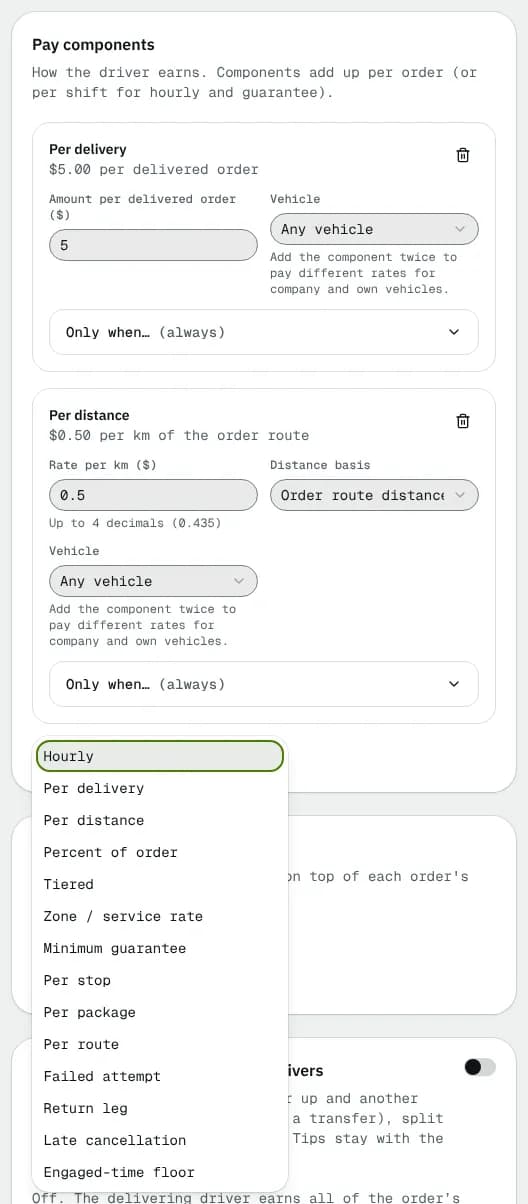
| Component | Fields | When it pays |
|---|---|---|
| Hourly | Rate per paid hour ($); Vehicle | Per shift: hours minus unpaid breaks |
| Per delivery | Amount per delivered order ($); Vehicle | Each delivered order |
| Per distance | Rate per km (Rate per mile on a plan in miles; up to 4 decimals, e.g. 0.435); Distance basis: Order route distance, Route distance (paid when a route completes) or Shift odometer distance; Vehicle | Per order, route or shift |
| Percent of order | Percent (%); Of: Order subtotal, Order total or Chosen parts of the price (tick Base rate, Fuel surcharge, Insurance / declared value, Waiting time, Other options and surcharges, Discounts, Minimums, caps and price adjustments, Tolls, Charges after pickup or delivery); Minimum per order ($) and Maximum per order ($) (0 = none); Vehicle | Each delivered order |
| Tiered | Tier by: Distance, Weight or Delivery number of the day; rows of Up to (inclusive) and Pays ($), last row open-ended; Add tier | Each order, the first tier that fits |
| Zone / service rate | Rows of Match (Service with a Service name, or Postal code prefix with Postal code starts with, for example M5V) and Pays ($); Add rate; Everything else pays ($) | Each order. Service rates win over postal code rates |
| Minimum guarantee | Daily minimum ($) or Minimum per pay period ($); Per: Day (when a shift ends) or Pay period (when it closes) | Tops gross earnings up to the minimum (deductions, reimbursements and tips don't count) |
| Engaged-time floor | Minimum per engaged hour ($) | At period close, tops gross earnings up to this rate × engaged hours (from being assigned or accepting a job to delivering it; overlapping jobs count once). For example Ontario's Digital Platform Workers' Rights Act. Tips are paid on top |
| Per stop | Per stop ($) (stops at one address count once); Unpaid stops per route ("$0.50 per stop over 140" = 140); Vehicle | When a route completes, or per job off a route (a multi-stop job pays each stop done) |
| Per package | Per package ($); Free packages per stop ("per extra package" = 1); Vehicle | Per stop delivered on a route; once per job off a route |
| Per route | Per completed route ($); Vehicle | When the route completes |
| Failed attempt | Leg: Pickup or delivery, Pickup only, Delivery only; an amount rule | Each failed attempt |
| Return leg | An amount rule | When the order is returned to the sender |
| Late cancellation | Once the order is (Driver assigned, Driver accepted, Driver on the way to pickup, Driver at pickup, Picked up); And less than … min before pickup (0 = any time); an amount rule | A cancellation after that point |
Vehicle: Any vehicle, Company vehicle only or Driver's own vehicle only. Add the component twice to pay different rates for company and own vehicles.
The amount rule of the three outcome components has a Type (Flat amount, Percentage, Per unit, Bands). A percentage can be of Delivery pay (what delivering it would pay), Order price or a part of the price, with Plus fixed; per unit counts the distance, packages or weight of the order, with a rate, Free units and Bill in steps of; bands pay by band. Minimum and Maximum cap it.
Staff components
| Component | Fields | When it pays |
|---|---|---|
| Fixed salary | Amount per pay period ($) | Once per pay period, when it closes |
| Hourly (logged hours) | Rate per hour ($) | Hours logged on the Payroll page |
| Per order handled | Tiers of Orders … up to and Pays per order ($), last one open-ended; Add a tier | Each order the team member handled, by its number in the calendar month |
A note on staff plans says which team member an order counts for (set in Payroll settings); the count restarts every month.
Modifiers (driver plans)
Extras and deductions on top of each order's component pay. Pick one in Add a modifier….
| Modifier | Fields |
|---|---|
| Rush | Rush bonus type (Flat amount or % of order pay) and the amount |
| Wait time | Free minutes, Per extra minute ($), Cap per order ($) (0 = no cap) |
| Long distance | Beyond (km) and Per extra km ($) (mi and mile on a plan in miles) |
| Peak window | From and Until (completion time), the days (none = every day) and the Peak bonus (flat or %) |
| Tip pass-through | No fields: the customer's tip goes to the delivering driver in full |
| Bonus | Paid when: Delivered on time, Every order or Reaching a daily delivery count (with Delivery number); Bonus ($); Label (shown on statements) |
| Deduction | Applied to: Each order, Each shift or Orders and shifts; Label; Deduction type (flat or %) and amount |
Bonuses (staff plans)
Bonus only: Paid when Every order handled or Reaching an order count this month (with Order number of the month), Bonus ($) and Label. One-off bonuses are adjustments on the pay period; recurring ones are recurring adjustments.
Only when… (conditions)
Driver components and modifiers that pay per order or route (all except hourly, shift distance, guarantees and shift deductions) have an Only when… section, (always) until you set something. Conditions: Days, From (time) / Until (time) (an earlier "Until" means overnight), From date / Until date, Vehicle class, Pickup in zone, Delivery in zone (your pricing zones), Payment method (On account, Cash on delivery, Prepaid), Priority and Customers (empty = every customer). Route pay can only depend on the day, time, dates and vehicle class. Times are read when the pay is earned, in your company's time zone.
Pickup and delivery by different drivers
Switch on to split each order's pay when one driver picks up and another delivers (a hub hand-off). Pickup driver's share (%); the delivering driver gets the rest. Tips stay with the delivering driver. Off: the delivering driver earns everything.
Vehicle allowance
Switch on to pay mileage when the shift's vehicle is the driver's own.
- Presets in your distance unit: CRA 2026: 73 ¢ / km for the first 5,000 km, 67 ¢ after or CRA 2026, territories: 77 ¢ / km for the first 5,000 km, 71 ¢ after (km plans) or IRS 2025: 70 ¢ / mile (mile plans). Rates change every year; edit after applying.
- Per km driven ($), or Use annual bands: rows of Up to (km a year) and Per km ($) (miles on a plan in miles) with an open-ended After that band; Add a band. Bands count the distance reimbursed this calendar year.
- Per day worked ($).
- Also pay for leased vehicles.
Simulator (driver plans)
Try the plan without saving. Sample order: Distance, Subtotal ($), Total ($), Wait (min), Tip ($), Weight, Delivery # of the day, Completed at, Weekday, Service name, Delivery postal code. Optional route (Stops, Packages per stop, Route distance) and shift (Paid hours, Distance, Reimbursed earlier this year, Earned earlier that day ($)). Two totals show side by side, Company vehicle and Driver's own vehicle; click one to see its lines and Total, plus If the sample order isn't delivered for outcome pay.
For this month (staff plans)
Pick a Team member to start from their pace this month, or type Orders handled, Hours logged and Pay periods: it shows this month's pay with the plan.
Versions, publishing and assignments (existing plans)
- Publish a new version: Effective from (today or later) and Note (optional), then Publish version. Orders and shifts completed earlier keep their pay. Publish version… in the header jumps to this card. A problem in the rules shows Fix this before publishing in the card.
- Versions: every version with its start date and note; Current marks the one in effect; Load copies a version into the editor.
- Assignments: who uses the plan and from when; End stops an open assignment.
- Assign drivers: Applies to Employment type (employee, independent contractor, contracted company), Vehicle ownership (company, driver, leased) or Tenant default, and Effective from. It replaces the current assignment of the same target. Single drivers are assigned on their profile.
- Assign team members: Team member and Effective from; it replaces their current staff plan from that day.
- Archive / Restore: an archived plan can't be assigned.
Good to know
- A plan with no component can't be saved ("Add at least one pay component."); other problems show in the red box naming the field.
- Worked examples: Set up driver pay plans and Route, outcome and conditional pay.
Related articles
- How-toSet up driver pay plansBuild a pay plan from components and modifiers, pay different rates for own and company vehicles, try it in the simulator, assign it to groups of drivers and publish new versions.
- How-toRoute, outcome and conditional payPay drivers per stop, package or route, for failed attempts, returns and late cancellations, only under conditions, split between pickup and delivery drivers, and pass tips on in full.
- How-toPay dispatchers and office staffPay team members a salary per pay period, logged hours and a rate for every order they handle, with tiers, bonuses and their own statements.
- Page guidePay period detailOne pay period from open to paid: close it, generate and review statements, resolve disputes, add adjustments, log hours, approve, export, email and mark it paid.
Still stuck?
Tell us what you were trying to do. A person reads every message.