Invoices
The Invoices page of the portal: the amount due banner, the tabs, the invoice table, paying several invoices at once, the payment window, Payments & credit and the statement.
On this page
Invoices lists what your courier billed your company and lets you pay online. Open it from the top bar. You need View invoices; paying needs Pay invoices. For the task step by step, see Pay invoices.
At a glance
| Area | What it does |
|---|---|
| Statement | Download a statement of account as a PDF |
| Saved cards & auto-pay | Open Saved cards (with Pay invoices and access to every order of the company). On a phone the button reads Saved cards |
| Amount due banner | What you owe now, with a pay button |
| Tabs | All, To pay, Paid, Payments & credit |
| The invoice table | One row per invoice, with Pay or View |
| Selection bar | Pay several ticked invoices in one go |
The amount due banner
Shows Amount due (the total of every open invoice), how many invoices are open and how many are overdue with their amount. It is red when something is overdue, amber otherwise. The button pays the oldest open invoice first: Pay the oldest overdue, or Pay INV-1042 when nothing is overdue. When nothing is owed you see You're all paid up. If you only see the invoices for your own orders it says No open invoices for your orders. instead.
When your courier hasn't set up online payment yet, there are no Pay buttons or check boxes: a note under the banner says so and asks you to pay by bank transfer or cheque, or to contact the courier.
Tabs
| Tab | Shows |
|---|---|
| All | every invoice |
| To pay | pending and overdue invoices; here you can tick several |
| Paid | paid invoices |
| Payments & credit | your payments, receipts, credit and credit notes (below) |
The invoice table
| Column | What it shows |
|---|---|
| Invoice | The number, how many orders it covers, and when set: for another company of your group, the location, PO and the PO number |
| Issued | The invoice date |
| Due | The due date (red when overdue) |
| Status | To pay, Overdue, Paid or Voided |
| Total | The invoice total, tax included |
| Amount due | What is still unpaid |
At the end of each row, the download icon saves the PDF. Pay (open invoices, with Pay invoices) opens the payment window; otherwise View opens the invoice. On a phone each invoice is a row with its number, status, due date and amount.
Pay several at once
On To pay, tick the invoices. The bar at the bottom shows 2 selected and their total; Pay 2 invoices opens one payment for all of them, Clear unticks.
The payment window
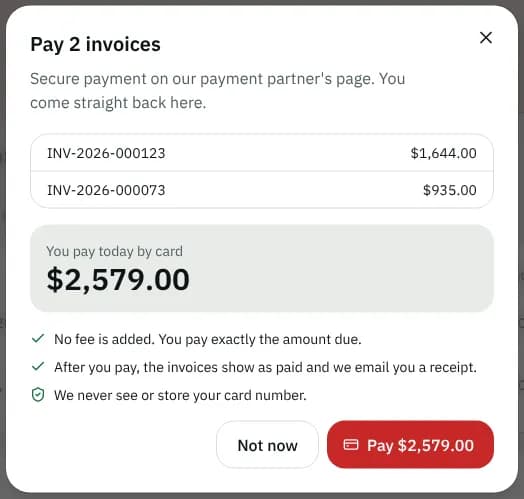
| Part | What it is |
|---|---|
| Invoice list | When paying several, each invoice and its amount |
| Use my credit ($40.00 available) | Ticked by default when you have credit; it comes off this payment |
| Also pay $25.00 owed on my account | Shown when a reversed payment left money owing; ticked by default |
| Pay with | Card (paid instantly) or Bank debit (clears in a few business days), when your courier takes bank debits |
| You pay today by card | The amount charged, with how it was worked out (due, credit, owed, surcharge) |
Some couriers add a card surcharge; the window says Includes a 2.4% card surcharge (their rate) and bank debit has none. Otherwise it says No fee is added. You pay exactly the amount due.
Pay $… opens your courier's secure payment page; you come straight back. Not now closes the window. If your credit covers everything, no card is needed: the invoice is settled when your courier applies the credit.
Payments & credit
- Credit on your account shows your credit balance; it is used on open and next invoices, and you can use it when you pay by card. Credit notes are listed with their number, amount, reason and date, each with a PDF button.
- A red line appears when money is owed on your account after a reversed payment.
- Payments lists each payment: amount, date, Reversed when it was reversed, the method (Card, Account credit, a method your courier recorded such as a cheque or bank transfer), the invoice it paid and its receipt number. Receipt opens the receipt.
With no payments yet you see No payments yet.
The statement
Statement opens Download your statement. Choose Last 90 days, This year or Pick dates (From and To), then Download PDF. It lists every invoice and payment in the period, what is still open and your credit.
Statuses
| Status | Meaning |
|---|---|
| To pay | Sent and waiting for payment |
| Overdue | Past the due date and still unpaid |
| Paid | Paid in full |
| Voided | Cancelled; no payment is expected |
Good to know
- You are invoiced for completed orders on your billing cycle, so the first invoice appears after your first delivery is billed (No invoices yet until then).
- The portal never sees your card number or bank login; the payment page is your courier's payment partner.
- The table shows up to 50 invoices per tab.
Related articles
- How-toPay invoicesSee what you owe, pay one or several invoices by card, download receipts and statements, and let saved cards pay invoices on their due date.
- Page guideSaved cards and auto-payThe Saved cards & auto-pay page of the portal: saving a card or bank account, turning auto-pay on and off, failed automatic payments and removing a card.
Still stuck?
Ask your courier company: they can see your account. Or tell us what you were trying to do.