COD cash
Cash on delivery from collection to hand-in: the totals, the Cash in hand, Collections, Exceptions and Remittances tabs, receiving cash, disputes, shortfalls, short payments and COD settings.
Watch: Cash on delivery: collect, receive, reconcile
1:50See who holds COD cash and for how long, receive it from a driver, and settle a shortfall without losing the trail.
On this page
COD cash tracks the money drivers collect on cash-on-delivery orders: what each driver still holds, every collection, what was handed in and every difference to resolve. Everyone can view it by default; receiving cash, disputes, resolutions and COD settings need COD edit rights (Admin, Operations Manager, Dispatcher and Finance by default).
At a glance
| Area | What it shows or does |
|---|---|
| Header | COD settings and Receive cash |
| Totals | Cash in hand, Overdue for remittance, Open exceptions, Remitted |
| Tabs | Cash in hand, Collections, Exceptions, Remittances (the selected tab is in the address bar) |
How a COD collection starts
A COD order carries an amount the driver collects from the receiver: the value of the customer's goods, collected on the customer's behalf (set on the staff order form, in the customer portal, by import or through the API). When the driver completes it, they record the amount collected and the Method (Cash, Cheque or Card on delivery), with a reason if it differs. Staff completing a COD delivery from the order or a route stop fill in the same Collected and Method fields. The collection gets a numbered receipt (TR-…) for the goods money, with no tax on it.
The cash is the customer's money, not yours: it is never taxed and never counts as sales. The order's delivery price and its charges (a COD fee included) go on the customer's invoice like any other order. Once the cash is final (you receive it from the driver, or a dispute about it is resolved), the full amount the receiver paid is added to the customer's account as credit, which pays their invoices; the rest stays on their account.
Totals
| Card | What it shows | Click |
|---|---|---|
| Cash in hand | Cash drivers still hold, with the number of collections and drivers | Cash in hand tab |
| Overdue for remittance | Cash held longer than your reminder window, and how many drivers | Cash in hand tab |
| Open exceptions | Open shortfalls, short payments and disputes, with the money short from drivers and unpaid by receivers | Exceptions tab |
| Remitted | Received from drivers, all time | Not a link |
Cash in hand tab
One row per driver holding cash.
| Column | What it shows |
|---|---|
| Driver | Name and driver ID |
| In hand | The cash they hold |
| Collections | How many collections |
| Oldest cash | Age of the oldest collection: green within the reminder window, amber past it, red at twice the window |
| Receive cash | Opens the Receive cash dialog for this driver (COD edit rights) |
No driver is holding cash when nothing is outstanding.
Collections tab
Every COD collection. Filters: All statuses (several at once), All drivers, All customers, the Collected date range (All dates, with presets such as This month and Last month) and Search order number…. Export downloads the filtered list as CSV (order, customer, driver, collected at, method, expected, collected, variance and reason, status, shortfall, resolution, remittance, currency).
| Column | What it shows |
|---|---|
| Order | Opens the order |
| Customer / Driver | Whose goods money it is, who collected |
| Collected | Collection date (hover for the time) |
| Method | Cash, Cheque or Card on delivery |
| Due | What was due at the door |
| Collected (amount) | What the driver took |
| Difference | Collected minus due; hover for the driver's reason |
| Status | Status badge, plus Receiver short … when the receiver paid less than due |
Row ⋯:
| Item | Shown when |
|---|---|
| View order | Always |
| Receipt … | The collection has a receipt; opens the PDF |
| Receive cash | Collected or in hand |
| Dispute | Collected or in hand (not network jobs). Enter What is disputed? and click Mark as disputed: the cash leaves the driver's balance and goes to Exceptions |
| Resolve… | An unresolved shortfall or dispute |
| Short payment… | The receiver paid less than due and nothing is decided yet |
| View short-payment invoice | A short payment was billed to the customer before this choice was removed (older collections only) |
Tick collections of one driver that are collected or in hand, then click Mark remitted in the bar to receive just those.
Exceptions tab
The same table, limited to open shortfalls, short payments and disputes. Show resolved lists the ones already handled (kept for the audit trail); Show open goes back. No open exceptions when all is clear.
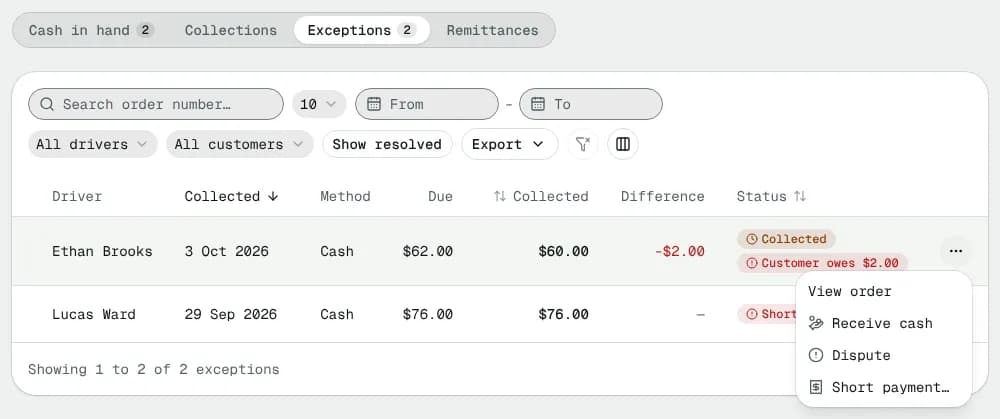
Resolve a shortfall or dispute
| Choice | What it does |
|---|---|
| Cash is still with the driver | Disputes only: back to cash in hand, received with the next remittance |
| Write off … | The business absorbs the loss; driver pay is untouched |
| Deduct … from …'s pay | Adds a negative line to the driver's open pay period. Needs Deduct shortfalls from driver pay on in COD settings |
A Note (kept in the audit trail) of at least a few words is required. The button reads Reopen as cash in hand, Write off or Deduct from pay.
Short payment
When the receiver paid less than due at the door, the driver is not charged: they hand in what they collected. The customer is credited what the receiver paid either way; this choice decides the rest.
| Choice | What it does |
|---|---|
| Nothing more was owed | The customer gets only what was collected. For example the receiver refused part of the goods, or the amount due was wrong |
| Write off … | The business absorbs it: the unpaid part is also credited to the customer, so they get the full amount due |
A note is required. A driver who gave "partial refused" as the reason is recorded as not owed automatically.
Remittances tab
Every hand-in: Received (date and time), Driver, Collections, Expected, Received, Difference, Received by, Notes, and Print slip for a handover slip with the orders, amounts, difference and signature lines.
The Receive cash dialog
- Pick the Driver (preset when opened from a row).
- Their collections are listed and ticked; untick any they are not handing in now.
- Expected from … shows the total. Type the Amount received; the dialog says Matches what was collected, Short by … or Over by ….
- If it differs, a Reason for the difference is required. A shortfall is recorded on the newest collections and listed under Exceptions. The customers are still credited everything their receivers paid: a driver's shortfall is between you and the driver.
- Add Notes (optional) and click Receive ….
COD settings
| Setting | What it does |
|---|---|
| Remind after (days) | 1–30 (default 2). Cash older than this turns amber, twice as old turns red, and drivers and you get a daily reminder |
| Deduct shortfalls from driver pay | Off: shortfalls are only recorded. On: an unresolved shortfall can be deducted from the driver's next pay period |
Click Save settings.
Statuses
| Status | Meaning | Next |
|---|---|---|
| Collected | Cash taken before the delivery was completed | Becomes In hand when it completes; or received → Remitted |
| In hand | Held by the driver after the delivery completed | Received → Remitted; or disputed |
| Remitted | Handed in | Final |
| Shortfall | The driver handed in less | Resolve: write off or deduct |
| Disputed | You questioned it | Resolve: reopen, write off or deduct |
In the table both show the badge Collected until the cash is handed in; the status filter tells them apart.
Good to know
- Steps: Collect cash on delivery from drivers.
- A deduction lands in Payroll as a negative line in the driver's open period.
Related articles
- How-toCollect cash on delivery from driversSee which driver holds how much COD cash, receive it when they hand it in, and sort out shortfalls and disputes.
- Page guidePay period detailOne pay period from open to paid: close it, generate and review statements, resolve disputes, add adjustments, log hours, approve, export, email and mark it paid.
- How-toFind delivered orders that are not invoicedSee which customers have delivered orders that are not on an invoice yet, and bill them in a few clicks.
- Setup pathHow your customers paySet up each way a customer can pay you: on account with invoices and terms, by card or bank debit through Stripe (pay links, the portal, auto-pay, prepaid orders), or cash on delivery, and what to configure for each.
- ConceptHow money moves in NemiRouteThe path of every dollar: an order's price and tax, the invoice, card, bank debit, manual and cash-on-delivery payments, credit, credit notes and refunds, statements and aging, and driver and staff pay from completed work.
Still stuck?
Tell us what you were trying to do. A person reads every message.