Collect cash on delivery from drivers
See which driver holds how much COD cash, receive it when they hand it in, and sort out shortfalls and disputes.
Watch: Cash on delivery: collect, receive, reconcile
1:50See who holds COD cash and for how long, receive it from a driver, and settle a shortfall without losing the trail.
On this page
When a driver collects cash on delivery, the money stays with them until they hand it in. The cash is the value of your customer's goods, collected from the receiver on the customer's behalf: it is not your sales and carries no tax. The delivery price is on the customer's invoice as usual. COD cash shows who holds what and records each hand-over. Receiving cash and resolving exceptions needs COD edit rights (Admin, Operations Manager, Dispatcher and Finance roles).
See who holds cash
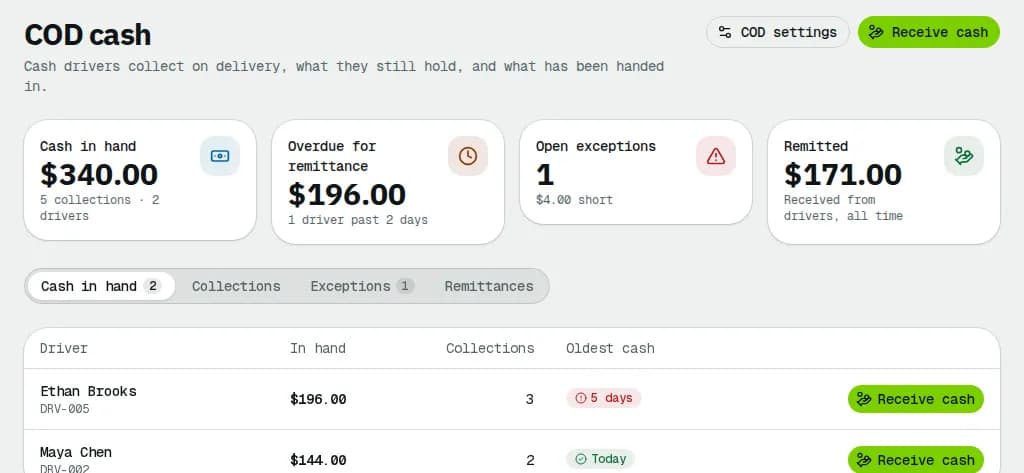
The cards show the Cash in hand, the cash Overdue for remittance, the Open exceptions and everything Remitted so far. The tabs:
- Cash in hand: one row per driver with the amount, the number of Collections and the age of the Oldest cash (amber when it is late, red at twice that).
- Collections: every COD collection, with what was Due, what was Collected and the Difference. Filter by status, driver, customer or date, and Export the list.
- Exceptions: shortfalls and disputes still to resolve. Show resolved lists the ones already handled.
- Remittances: every hand-over, with Print slip for a handover slip with signature lines.
Receive cash from a driver
- Click Receive cash on the driver's row (or at the top of the page and pick the Driver).
- All the cash the driver holds is ticked. Untick collections they are not handing in now.
- Count the money and type it in Amount received. It starts at the expected amount.
- If it does not match, the dialog says Short by or Over by; type the Reason for the difference.
- Add Notes if you like and click Receive ….
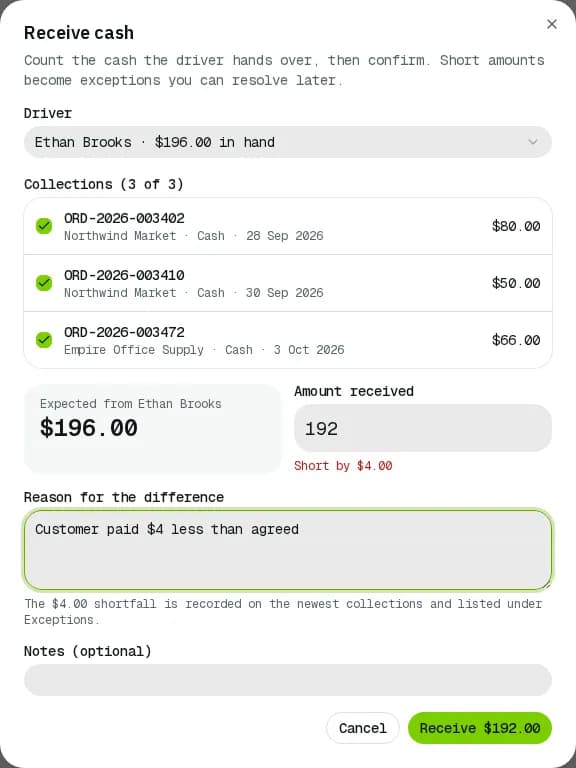
A shortfall is recorded on the newest collections and appears under Exceptions. To receive only some collections of one driver, you can also tick them in Collections and click Mark remitted.
The customer's money goes on their account
When you receive the cash, everything the receivers paid goes on each customer's account as credit ("Cash on delivery collected on …"), even when the driver handed in less. A dispute ending in Write off or Deduct credits it then. Example: the receiver pays $500 for the goods; the $40 + HST delivery ($45.20) is on the customer's invoice, paid from the $500 credit, and $454.80 stays on their account.
Resolve shortfalls and disputes
- To question a collection that is still with the driver, open its ⋯ in Collections and pick Dispute. Say What is disputed? and click Mark as disputed.
- In Exceptions, open the row's ⋯ and pick Resolve…. Choose:
- Write off …: the business absorbs the loss.
- Deduct … from …'s pay: adds a negative line to the driver's open pay period.
- Cash is still with the driver (disputes only): back to cash in hand.
- Write a note (it stays in the audit trail) and confirm.
When the receiver paid less than due
If the driver collected less than the amount due (for example the receiver was short), the row shows Receiver short … and appears under Exceptions. The driver is not charged for it: they hand in what they collected, and your customer is credited what the receiver paid. Open the row's ⋯, pick Short payment… and choose:
- Nothing more was owed: the customer gets what was collected. For example the receiver refused part of the goods. A driver who gave "partial refused" as the reason is recorded this way automatically.
- Write off …: the business absorbs it: the unpaid part is credited to the customer too, so they get the full amount due.
The unpaid part is never billed to your customer: it is their goods money that their receiver kept.
Related articles
- How-toPay periods and statementsClose a pay period, review and fix driver and staff statements, approve, record the payment and export to your payroll system.
- How-toFind delivered orders that are not invoicedSee which customers have delivered orders that are not on an invoice yet, and bill them in a few clicks.
- ConceptWorked examples - cash on delivery and card paymentsReal numbers for cash collected at the door (short payments, who carries the loss, short remittances, aging) and for card payments (overpayments held as credit, refunds, voids, fees, net to you and the card surcharge).
- Page guideCOD cashCash on delivery from collection to hand-in: the totals, the Cash in hand, Collections, Exceptions and Remittances tabs, receiving cash, disputes, shortfalls, short payments and COD settings.
Still stuck?
Tell us what you were trying to do. A person reads every message.