Export to QuickBooks, Xero or a spreadsheet
Download invoices or payments for a period as a CSV laid out for the QuickBooks Online or Xero importer, and find the other CSV exports.
On this page
At month end, download your invoices and payments in the layout that QuickBooks Online or Xero imports. This needs the Finance, Operations Manager or Admin role.
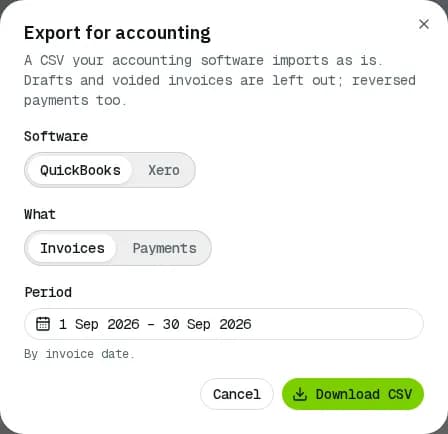
Export for QuickBooks or Xero
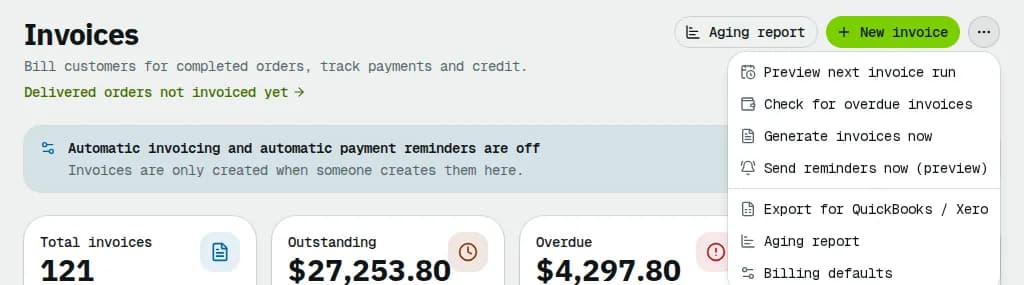
- Open Invoices and click the ⋯ button next to New invoice.
- Pick Export for QuickBooks / Xero.
- Under Software, choose QuickBooks, Xero or Spreadsheet (one row per order with a column per charge type, such as the fuel surcharge, and a total row).
- Under What, choose Invoices, Payments or Credit notes. Export each, one after the other, to bring your books up to date.
- Check the Period. It starts on last month. Invoices are picked by invoice date, payments by the day the money was received.
- Click Download CSV, then import the file with your accounting software's own import tool.
Each invoice comes out as one row per order and charge type (delivery, fuel surcharge, accessorials, tolls, discounts, late charges), each with its tax code and tax amount, so GST, QST and HST land on the right lines.
Set up items, accounts and tax codes
Open Billing settings and scroll to Accounting export:
- Rows: one row per order and charge type, or one row per charge type for the whole invoice.
- QuickBooks Online: the date format, the tax layout (US: one tax amount per invoice; Canada: a tax code and tax amount on every line), the product / service for each charge type, and the tax code for each tax combination (for example HST ON or GST/QST QC). QuickBooks links each product / service to its income account.
- Xero: the date format, the income account code for each charge type, and the tax rate for each tax combination.
Canadian businesses start with the QuickBooks Canada layout and day/month/year dates; everyone else starts with the US layout. Change anything that doesn't match your accounting file before the first import.
Other CSV exports
Every list below exports what its filters show, with Export > Export CSV unless noted:
| What | Where |
|---|---|
| Invoices with subtotal, tax, paid and amount due | Invoices. Tick rows and click Export in the bar for just those. |
| Payments with method, reference, credit, refunds and reversals | Payments |
| Open amounts per customer and days past due | Aging report, Export |
| Cash-on-delivery collections | COD cash, Collections tab |
| Driver pay lines, QuickBooks or Gusto files | A pay period in Payroll, Export menu (see Pay periods and driver statements) |
Example: one Québec invoice
Invoice INV-2026-0042 for Maple Leaf Bakery, dated 26 October 2026, Net 30: order SHP-2043 (Express) with a $100.00 delivery and a $10.00 fuel surcharge, taxed GST 5 % ($5.50) and QST 9.975 % ($10.97) on $110.00, total tax $16.47. With the Canadian defaults (Rows per order and charge type, QuickBooks layout Canada / UK / AU, dates day/month/year) the QuickBooks file has two rows:
| InvoiceNo | InvoiceDate | Item(Product/Service) | ItemDescription | ItemAmount | ServiceDate | ItemTaxCode | ItemTaxAmount |
|---|---|---|---|---|---|---|---|
| INV-2026-0042 | 26/10/2026 | Delivery services | Delivery SHP-2043 (Express) | 100.00 | 25/10/2026 | GST + QST QC | 14.97 |
| INV-2026-0042 | 26/10/2026 | Fuel surcharge | Fuel surcharge SHP-2043 | 10.00 | 25/10/2026 | GST + QST QC | 1.50 |
The two tax amounts add up to the invoice's $16.47. Map GST + QST QC to your own tax code under Accounting export (the default code is named after the taxes). The Xero file has the same rows with the account code 200 and the tax type you mapped (Tax on Sales until you change it), dates as 2026-10-26.
Related articles
- How-toRecord and reverse paymentsRecord cheques, bank transfers and cash on one or several invoices, send receipts, undo a payment recorded by mistake and find any payment.
- How-toPay periods and statementsClose a pay period, review and fix driver and staff statements, approve, record the payment and export to your payroll system.
- ConceptWorked examples - tax, invoices and paymentsReal numbers for GST/HST and QST by province, rounding, tax-included prices, exemptions, credit notes, due dates, early-payment discounts, aging, how a payment is spread, statements, credit limits and your own subscription bill.
- ConceptWorked examples - cash on delivery and card paymentsReal numbers for cash collected at the door (short payments, who carries the loss, short remittances, aging) and for card payments (overpayments held as credit, refunds, voids, fees, net to you and the card surcharge).
Still stuck?
Tell us what you were trying to do. A person reads every message.