Aging report and customer statements
See who owes what and how late, open the invoices behind each amount, and print, download or email a statement of account.
1 min readLast updated
On this page
The aging report shows every open invoice by how many days it is past due, per customer. A statement of account lists everything invoiced and paid for one customer over a period. Anyone who can see invoices can use both; emailing a statement needs the Finance, Operations Manager or Admin role.
Read the aging report
- Open Invoices and click Aging report.
- The cards at the top total the open amounts as Not yet due, 1-30 days, 31-60 days, 61-90 days and Over 90 days. Click a card to list those invoices.
- By customer shows the same buckets per customer, worst first. Click an amount to see those invoices, or the customer's name to see all their open invoices.
- Click Export for a CSV of the table.
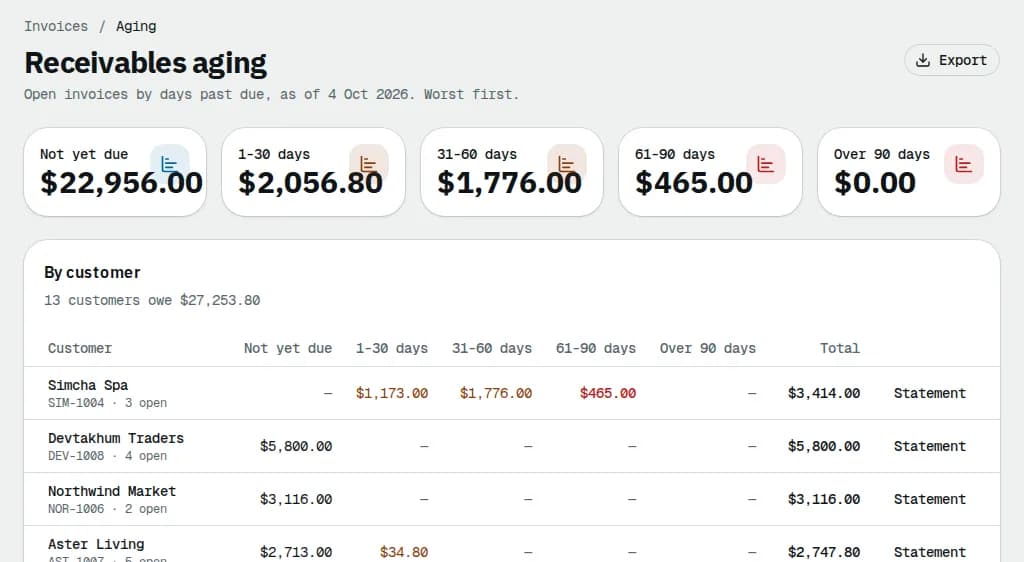
The invoices list has the same buckets as Days past due chips, plus the Overdue and Due this week quick filters.
Send a statement
- Click Statement on a customer's row in the aging report. You can also open it from an invoice (⋯ > Customer statement) or from the customer's Invoices or Billing page.
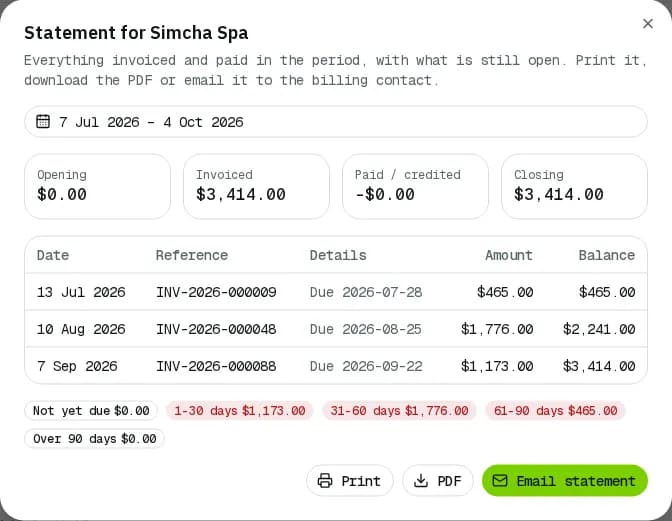
- The period is the last 90 days. Pick other dates with the period picker.
- Check the totals: Opening, Invoiced, Paid / credited and Closing. Below them, every invoice, payment and credit with a running Balance, then the open amount by age and any Credit available.
- Click Print, PDF, or Email statement to send the PDF to the customer's billing contact.
Related articles
- How-toRecord and reverse paymentsRecord cheques, bank transfers and cash on one or several invoices, send receipts, undo a payment recorded by mistake and find any payment.
- How-toCreate and send invoicesBill a customer's delivered orders plus any fees or discounts, check the draft, send or finalize it, print it and chase payment.
- How-toPay invoicesSee what you owe, pay one or several invoices by card, download receipts and statements, and let saved cards pay invoices on their due date.
- ConceptWorked examples - tax, invoices and paymentsReal numbers for GST/HST and QST by province, rounding, tax-included prices, exemptions, credit notes, due dates, early-payment discounts, aging, how a payment is spread, statements, credit limits and your own subscription bill.
- Page guideReceivables agingOpen invoices by days past due: the bucket totals, the per-customer table, statements and the CSV export.
Still stuck?
Tell us what you were trying to do. A person reads every message.