Receivables aging
Open invoices by days past due: the bucket totals, the per-customer table, statements and the CSV export.
On this page
Receivables aging shows who owes you money and how late it is: every open invoice (Pending or Overdue with money due), sorted into buckets by days past its due date, as of today. Open it with Aging report on Invoices or from the billing tools ⋯ menu. Everyone who can see invoices can open it.
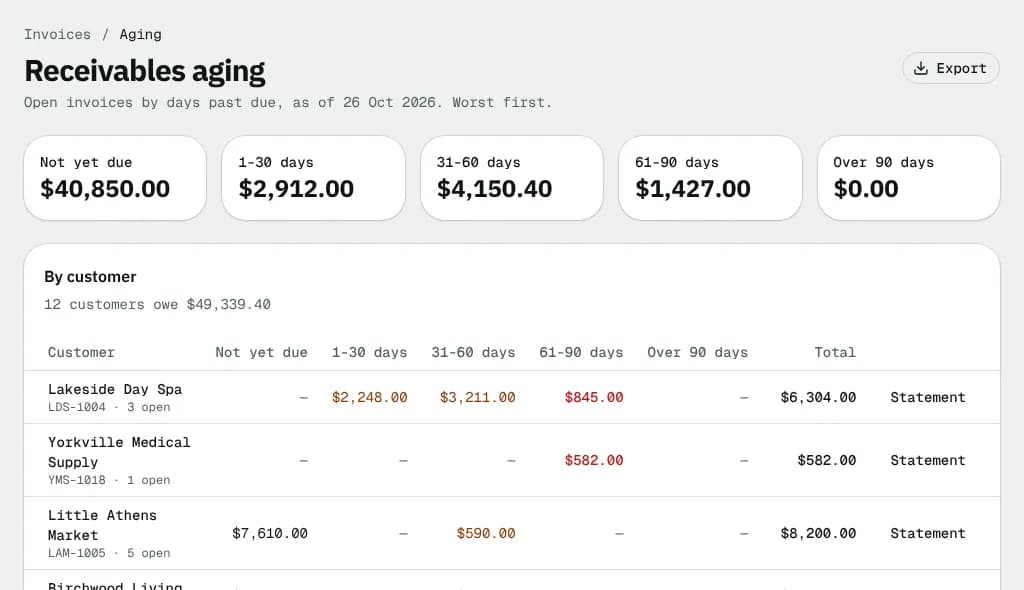
At a glance
| Area | What it shows or does |
|---|---|
| Header | The date the report is measured on, and Export |
| Bucket cards | The open amount in each bucket; click one to list those invoices |
| By customer | One row per customer that owes money, worst first, with a Statement button |
The bucket cards
| Card | What it holds |
|---|---|
| Not yet due | Open invoices whose due date has not passed |
| 1-30 days | 1 to 30 days past due |
| 31-60 days | 31 to 60 days past due |
| 61-90 days | 61 to 90 days past due |
| Over 90 days | More than 90 days past due |
Each card opens Invoices filtered to that bucket.
By customer
The card title says how many customers owe how much in total. If some invoices are in another currency, their totals are added after the main one.
| Column | What it shows |
|---|---|
| Customer | Name (opens their open invoices), customer ID and how many invoices are open |
| Not yet due … Over 90 days | The amount in each bucket. Click an amount to list that customer's invoices in that bucket. Late buckets are coloured |
| Total | Everything the customer owes |
| Statement | Opens the customer statement: pick a period, then Print, PDF or Email statement |
The last row, Total, adds up each column.
Export
Export downloads a CSV with one row per customer: Customer, Customer ID, Open invoices, one column per bucket and Total open. It is disabled when nothing is owed.
Empty and error states
- Nothing is outstanding: every issued invoice is paid or void. See invoices goes back to the list.
- If the report can't load, an error with Try again shows instead.
Good to know
- Drafts and voided invoices are never in the report; Paid invoices drop out the moment they are settled.
- The buckets count from the due date, so payment terms matter: an invoice on Net 30 is Not yet due for 30 days.
- Chasing late payers: Aging report and customer statements. Reminders can also go out on their own; see Billing defaults.
Related articles
- How-toAging report and customer statementsSee who owes what and how late, open the invoices behind each amount, and print, download or email a statement of account.
- Page guideInvoicesEvery part of the invoice list: totals, quick filters, days-past-due chips, the table, bulk actions, the Unbilled orders tab and the billing tools menu.
- How-toRecord and reverse paymentsRecord cheques, bank transfers and cash on one or several invoices, send receipts, undo a payment recorded by mistake and find any payment.
- ConceptWorked examples - tax, invoices and paymentsReal numbers for GST/HST and QST by province, rounding, tax-included prices, exemptions, credit notes, due dates, early-payment discounts, aging, how a payment is spread, statements, credit limits and your own subscription bill.
Still stuck?
Tell us what you were trying to do. A person reads every message.