Invoices
Every part of the invoice list: totals, quick filters, days-past-due chips, the table, bulk actions, the Unbilled orders tab and the billing tools menu.
Watch: From delivered orders to a paid invoice
1:59Find work you have not billed, build and check the invoice, send it, and record a part payment.
On this page
Invoices lists every invoice your company has issued, with what is outstanding and what still needs billing. Every default role can open it; creating, sending and recording payments needs invoice edit rights (Admin, Operations Manager and Finance by default).
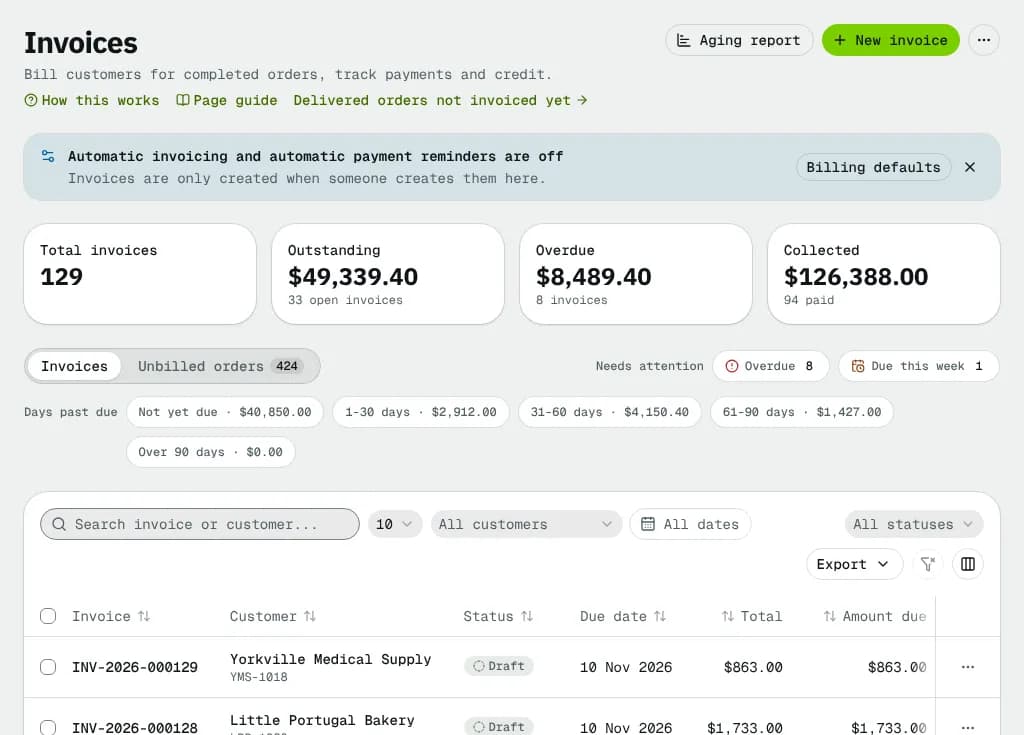
At a glance
| Area | What it shows or does |
|---|---|
| Header | Aging report and New invoice buttons, plus the ⋯ billing tools menu |
| Automation note | Says when automatic invoicing or automatic payment reminders are off |
| Totals | Total invoices, Outstanding, Overdue, Collected |
| View tabs and quick filters | One row: Invoices (the table) and Unbilled orders (delivered work not on an invoice yet) on the left; Overdue, Due this week and the Days past due chips beside them |
| Table | One row per invoice, with a row ⋯ menu |
| Bulk bar | Appears when you tick invoices |
Header buttons
| Button | What it does | Who sees it |
|---|---|---|
| Aging report | Opens Receivables aging | Everyone who sees invoices (hidden on phones; also in the ⋯ menu) |
| New invoice | Opens the new invoice form | Invoice create rights |
| ⋯ (Billing tools) | The billing tools menu below | Invoice edit rights |
The billing tools menu
Each tool shows what it would do before it changes anything.
| Item | What it does |
|---|---|
| Preview next invoice run | Pick a run date and see Will be invoiced (customer, orders) and Not invoiced, and why |
| Check for overdue invoices | Counts pending invoices past their due date; Mark as overdue sets them to Overdue and notifies the customers |
| Generate invoices now | Bills every customer with automatic invoicing that has billable orders, ignoring the schedule. Each customer's own grouping applies; invoices are sent if their settings say so. Skipped customers are listed with the reason |
| Send reminders now (preview) | Lists the reminders your billing defaults schedule for today (each stage goes once). Send … emails them. Nothing is listed when reminders are off or every open invoice already got its reminder |
| Export for QuickBooks / Xero | Opens Export for accounting: choose Software (QuickBooks, Xero or Spreadsheet), What (Invoices, Payments or Credit notes; a spreadsheet exports invoices only) and the Period. See Export to QuickBooks, Xero or a spreadsheet |
| Aging report | Opens the aging report |
| Billing defaults | Opens Billing defaults |
Automation note
When automatic invoicing is off, the note says Automatic invoicing is off: invoices are only created when someone creates them here. When reminders are off, it says Automatic payment reminders are off (both off: Automatic invoicing and automatic payment reminders are off). With edit rights you get a button to Billing defaults (Turn on reminders when only reminders are off). The note disappears once both are on. Its × (Dismiss) hides it in this browser.
Totals
| Card | What it counts | Click |
|---|---|---|
| Total invoices | Every invoice | Not a link |
| Outstanding | Amount still due on Pending and Overdue invoices, with how many are open | Lists Pending and Overdue invoices |
| Overdue | Amount due on Overdue invoices | Lists Overdue invoices |
| Collected | Amount paid, with how many invoices are Paid | Opens Payments |
The amounts are in your company currency. Invoices of customers billed in another currency are never added in: they show under the count, for example "4 open invoices + US$600.00".
Filters and search
- Overdue (quick filter): invoices past their due date and marked Overdue, with the count.
- Due this week: Pending invoices due within 7 days, or past due and not yet marked Overdue.
- Days past due chips: Not yet due, 1-30 days, 31-60 days, 61-90 days, Over 90 days. Each chip shows the open amount in that bucket, measured today. Pick one to list the open invoices in it.
- Search invoice or customer...: matches the invoice number or customer name.
- All customers: pick one customer.
- Issue date (All dates): the invoice date range: Today, Last 7 days, Last 30 days, Last 90 days, This month, Last month or any range on the calendar; the × beside it clears it.
- All statuses: tick one or more statuses.
- Export: downloads a CSV of every filtered invoice (not just this page) with subtotal, tax, each tax line, total, paid, amount due, paid date, sent date and currency.
Filters, sort and page live in the address bar, so you can share or bookmark a filtered list.
The invoices table
| Column | What it shows |
|---|---|
| Invoice | The invoice number; click to open it |
| Customer | Name and customer ID |
| Status | See Statuses below |
| Invoice date | The date on the invoice |
| Due date | With … days overdue in red for overdue invoices |
| Orders | How many orders it bills |
| Total | Total with tax |
| Amount due | What is still owed |
Use the column menu to hide columns; your choice is remembered on this device.
The row ⋯ menu
| Item | Shown when | Needs |
|---|---|---|
| View invoice | Always | — |
| Print / Download PDF | Always | — |
| Send to customer | Draft | Invoice edit rights. Asks to confirm, then finalizes the draft and emails it with the PDF. To edit the email first, open the invoice |
| Send reminder | Pending or Overdue with money due | Invoice edit rights. Emails your reminder with the pay link and the PDF |
| Record payment | Pending or Overdue with money due | Invoice edit rights. Opens Record payment for this invoice |
| Edit invoice | Draft | Invoice edit rights |
| Delete | Draft | Invoice delete rights. Its orders become billable again |
Bulk actions
Tick invoices to open the bar. Invoices that don't fit an action are skipped and counted in the confirm message.
| Button | What it does |
|---|---|
| Send | Finalizes and emails each ticked draft. Finalized invoices can no longer be edited |
| Send reminders | Emails a reminder for each open ticked invoice to its billing contact |
| Record payment | Marks each open ticked invoice as paid in full today. For a partial payment use the invoice page |
| Download PDFs | One combined PDF of the ticked invoices in a new tab (at most 100) |
| Export | CSV of the ticked invoices |
Send, Send reminders and Record payment need invoice edit rights.
The Unbilled orders tab
Delivered and completed orders that are not on an invoice yet, one row per customer, oldest first. The tab shows the total order count; the card says how many orders and how much money are waiting.
| Column | What it shows |
|---|---|
| Customer | Name and ID; opens the customer |
| Orders | Count; click to see those orders in the orders list |
| Value | What they add up to |
| Oldest delivered | The earliest completion date |
| Automatic invoicing | On, or Off · bill by hand |
| Create invoice | Opens the new invoice form with this customer's orders ticked (invoice create rights) |
Cash-on-delivery orders appear here like any other: the cash collected for the customer's goods is credited to their account in COD cash, and their delivery is invoiced. When nothing is waiting you see Everything delivered is billed. Step by step: Find delivered orders that are not invoiced.
Statuses
| Status | Meaning | What happens next |
|---|---|---|
| Draft | Created, not yet issued. Can be edited or deleted | Send invoice or Finalize without sending makes it Pending |
| Pending | Sent and waiting for payment | Paid in full → Paid. Past its due date → Overdue (by the overdue check) |
| Overdue | Past the due date and still unpaid | Paid in full → Paid. Reminders go out on your schedule |
| Paid | Nothing left to pay | A reversed or refunded payment reopens it as Pending or Overdue |
| Voided | Cancelled; no payment is expected | Final. Its orders are billable again |
An invoice with a $0.00 total is marked Paid as soon as it is finalized.
Empty and error states
- No invoices yet: with a New invoice button and Add customer (customer create rights).
- No invoices match: your filters hide everything; Clear filters resets them.
- If the list or the totals fail to load, an error with Try again shows in their place.
Good to know
- Each invoice is in its customer's billing currency (usually your company currency, for example CAD). The money columns show each invoice in its own currency.
- Creating and sending one invoice step by step: Create and send invoices.
- How the money moves end to end: How money moves in NemiRoute.
Related articles
- How-toCreate and send invoicesBill a customer's delivered orders plus any fees or discounts, check the draft, send or finalize it, print it and chase payment.
- How-toFind delivered orders that are not invoicedSee which customers have delivered orders that are not on an invoice yet, and bill them in a few clicks.
- How-toRecord and reverse paymentsRecord cheques, bank transfers and cash on one or several invoices, send receipts, undo a payment recorded by mistake and find any payment.
- How-toAging report and customer statementsSee who owes what and how late, open the invoices behind each amount, and print, download or email a statement of account.
- How-toExport to QuickBooks, Xero or a spreadsheetDownload invoices or payments for a period as a CSV laid out for the QuickBooks Online or Xero importer, and find the other CSV exports.
- Page guideInvoice detailOne invoice end to end: its status, every action (send, finalize, record payment, apply credit, credit note, reminder, statement, void, delete, PDF), the payments list, amounts with tax, details and history.
- ConceptHow money moves in NemiRouteThe path of every dollar: an order's price and tax, the invoice, card, bank debit, manual and cash-on-delivery payments, credit, credit notes and refunds, statements and aging, and driver and staff pay from completed work.
Still stuck?
Tell us what you were trying to do. A person reads every message.