Find delivered orders that are not invoiced
See which customers have delivered orders that are not on an invoice yet, and bill them in a few clicks.
Watch: From delivered orders to a paid invoice
1:59Find work you have not billed, build and check the invoice, send it, and record a part payment.
On this page
Delivered orders that are not on an invoice are money you have not asked for yet. You find them per customer on the invoices page, or order by order in the orders list. Creating the invoice needs the Finance, Operations Manager or Admin role.
See unbilled orders per customer
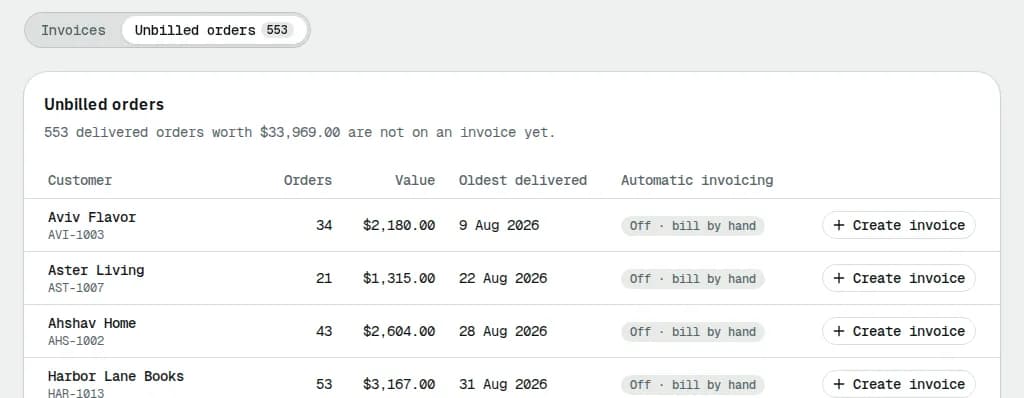
- Open Invoices and click the Unbilled orders tab. Its badge counts the orders.
- Each customer row shows the number of Orders, their Value, the Oldest delivered date and whether Automatic invoicing is On or Off · bill by hand. The oldest customers come first.
- Click Create invoice on a row. The new invoice form opens with all of that customer's orders ticked; untick any you want to keep for later.
- To see the orders themselves, click the number in the Orders column.
Pick orders in the orders list
- Open Orders and set the Billing filter to Unbilled (delivered, not invoiced). The link Delivered orders not invoiced yet under the Invoices title opens the same list.
- Tick the orders you want to bill.
- Click Create invoice in the bar at the bottom.
- If they all belong to one customer, the invoice form opens with exactly those orders.
- If they belong to several customers, a dialog lists them. Click Create … draft invoices to make one draft per customer, or Open invoice next to a customer to review that one first.
- Check and send the drafts as in Create and send invoices.

Orders that are not delivered or are already invoiced are left out and counted in the dialog (the dialog text also mentions cash on delivery, but a delivered cash-on-delivery order is billed for its delivery charge like any other).
Customers on automatic invoicing
Customers with Automatic invoicing On get their unbilled orders on the next automatic run. To see what that run will create, open the ⋯ menu next to New invoice and pick Preview next invoice run. A customer whose balance is under their minimum invoice amount is carried over to the following run.
Related articles
- How-toCollect cash on delivery from driversSee which driver holds how much COD cash, receive it when they hand it in, and sort out shortfalls and disputes.
- How-toFind and manage ordersFilter and search the orders list, save views, use the board, and act on many orders at once: assign, print labels, add to a route.
- ConceptWorked examples - tax, invoices and paymentsReal numbers for GST/HST and QST by province, rounding, tax-included prices, exemptions, credit notes, due dates, early-payment discounts, aging, how a payment is spread, statements, credit limits and your own subscription bill.
- ConceptWorked examples - cash on delivery and card paymentsReal numbers for cash collected at the door (short payments, who carries the loss, short remittances, aging) and for card payments (overpayments held as credit, refunds, voids, fees, net to you and the card surcharge).
Still stuck?
Tell us what you were trying to do. A person reads every message.