Orders
Every tab, filter, column, button and status on the Orders page of the portal.
On this page
Orders lists every order your company placed that you are allowed to see, newest first. Open it from the top bar (or the bottom bar on a phone). You need View orders; your primary contact may also limit you to your own orders or your location's orders.
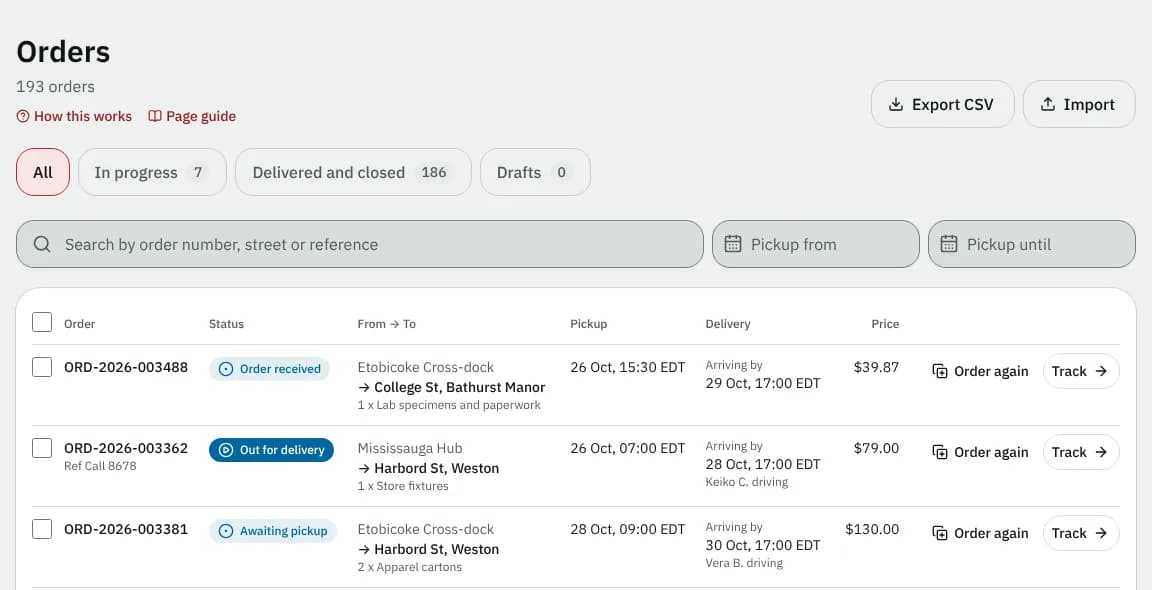
At a glance
| Area | What it does |
|---|---|
| Title line | How many orders match (12 orders, or 3 orders match while you filter) |
| Export CSV, Import | Download the list, upload a spreadsheet (start a single order with New order in the top bar) |
| Tabs | All, In progress, Delivered and closed, Drafts, each with its count |
| Search and dates | Find by order number, street or reference; narrow by pickup date |
| The list | One row per order (click anywhere on it to open it), with Order again and Track, View or Continue |
| Selection bar | Print labels for the orders you ticked, pinned to the bottom of the screen |
| Pages | Newer and Older, 20 orders per page |
The tab, search, dates and page are kept in the address bar, so you can bookmark or share a filtered list with a colleague.
Buttons at the top
| Button | Who sees it | What it does |
|---|---|---|
| Export CSV | everyone | Downloads the orders of the current tab, search and dates as a spreadsheet |
| Import | people who can place orders | Opens Import orders |
Import is hidden while your account is on hold. To start one order, use New order in the top bar (the round + on a phone).
Tabs
| Tab | Shows |
|---|---|
| All | every order, drafts included |
| In progress | placed and not yet delivered |
| Delivered and closed | delivered, returned and cancelled orders |
| Drafts | orders you started and haven't placed. They are saved automatically while you fill in the form. |
Search and dates
| Control | What to enter | Notes |
|---|---|---|
| Search by order number, street or reference | any part of an order number, a street name or your reference | Searches as you type |
| Pickup from | the first pickup date | Has quick picks and a clear button |
| Pickup until | the last pickup date | Can't be before Pickup from |
| Clear dates | Appears once a date is set |
When nothing matches you see No orders match with Clear filters.
The list
On a computer the list is a table:
| Column | What it shows |
|---|---|
| Order | The order number (or Draft) and Ref with your reference |
| Status | The status in plain words (see below) |
| From → To | Pickup and delivery place, and the packages (for example 2 x Printer paper + 1 more) |
| Pickup | The requested pickup day and time |
| Delivery | Arriving by and the time while it's on the way, Delivered and the time once delivered; who is driving |
| Price | The order total, when you are allowed to see prices |
At the end of each row:
- Order again copies the order into a new one (shown when your courier allows it);
- Track (moving orders), View (finished orders) or Continue (drafts) opens the order. Clicking anywhere else on the row does the same. A draft opens straight on the order screen.
On a phone each order is a compact row with its status, number (a draft shows when it was saved), destination and arrival time; tap it to open. The copy icon on the right is Order again.
Printing labels
When your courier lets you download documents, each placed order has a tick box (drafts and cancelled orders don't).
- Tick the orders, or the box in the header to tick every placed order on this page.
- In the Selected orders bar pinned to the bottom of the screen, click Print labels (3). A print-ready page with one shipping label per order opens in a new tab.
You can print up to 50 labels at a time; above that the bar says At most 50 labels at a time. Clear unticks everything.
Statuses
| Status | Meaning |
|---|---|
| Draft | Saved, not placed |
| Order received | Placed; your courier is lining up a driver |
| Driver assigned | A driver has the order |
| Finding a driver | The first driver declined; your courier is finding another |
| Awaiting pickup | The driver accepted it or is heading to the pickup |
| Being collected | The driver is at the pickup |
| Collected | Picked up |
| At the depot | Waiting at your courier's depot |
| Out for delivery | On the way to the receiver |
| Arriving now | The driver is at the delivery address |
| Delivered | Handed over |
| Pickup delayed / Delivery missed | An attempt failed; your courier will contact you or try again |
| Returning / Returned | Going back, or back, to the sender |
| On hold | Paused by your courier |
| Cancelled | Cancelled; no delivery |
Empty and error states
| Message | Why |
|---|---|
| No orders yet | Nothing placed yet. Place an order starts one. |
| Nothing in progress | No placed order is waiting for delivery. |
| No drafts | You have no unfinished orders. |
| We couldn't load this | A connection problem. Click Try again. |
Good to know
- Times are in your courier's time zone; the zone name is added when your computer is set to another one.
- The price column only appears when at least one order on the page has a price you may see.
- A page number past the end (for example from an old link) moves you to the last page.
To follow one order step by step, see Track your orders.
Related articles
- How-toTrack your ordersSee what is on the way on your Overview, follow an order step by step, download proof of delivery and share a tracking link with the receiver.
- How-toPlace an orderBook a pickup and delivery on the screen you land on, repeat an earlier order in one click, see the price before you place it, and change or cancel it while that is still allowed.
- How-toImport orders from a spreadsheetPlace many orders at once from a CSV or Excel file, match its columns, fix rows with problems and undo an import if needed.
- How-toSend to more than one place (multi-stop orders)Add extra drop-offs or pickups to one order, bring something back to the pickup, and follow every stop until the job is finished.
Still stuck?
Ask your courier company: they can see your account. Or tell us what you were trying to do.