Overview
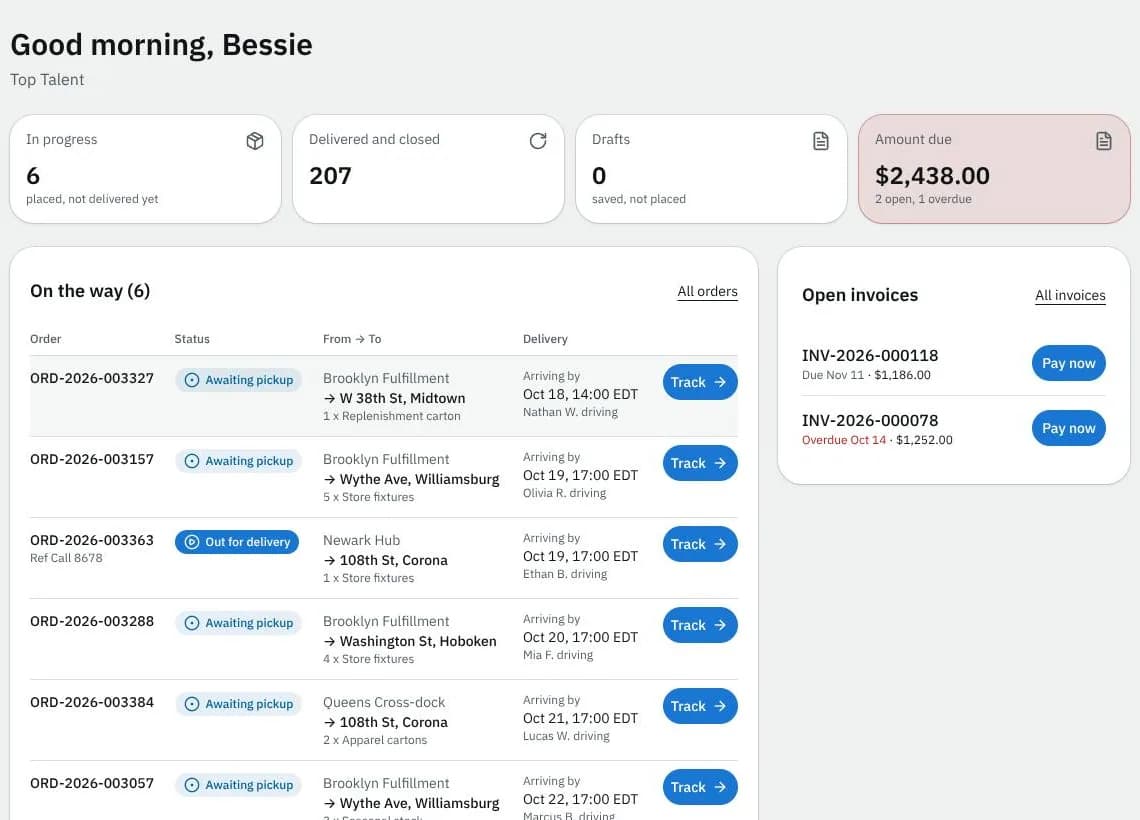
Every part of the portal Overview page: the greeting, the tiles, your unfinished draft, the orders on the way, open invoices and the messages you may see.
On this page
The Overview sums up what is moving, what is waiting and what you owe. Open it with Overview in the top bar (on a phone, the bottom bar). If you can't place orders, the portal opens on this page right after you sign in, and the menu item is called Home. What you see depends on what your company's primary contact lets you do (see Invite colleagues).
At a glance
| Area | What it shows or does |
|---|---|
| Greeting | Good morning, Good afternoon or Good evening with your first name (in your courier's time zone), your company underneath |
| Tiles | In progress, Delivered and closed, Drafts and Amount due |
| Continue your draft | The order you started and didn't place yet |
| On the way | Orders that are moving, with status and arrival time |
| Open invoices | Up to 5 unpaid invoices with Pay now (or View when your courier doesn't take online payment) |
The tiles
| Tile | What it counts | Click to open |
|---|---|---|
| In progress | placed, not delivered yet | Orders on In progress |
| Delivered and closed | finished orders | Orders on Delivered and closed |
| Drafts | saved, not placed (only if you can place orders) | Orders on Drafts |
| Amount due | what you owe, with how many invoices are open and overdue (or nothing to pay). If you only see the invoices for your own orders it reads Due on your orders (or nothing open for your orders) | Invoices on To pay |
The order tiles show only when you can view orders. Amount due shows only when you can view invoices; it turns amber when something is due and red when an invoice is overdue.
Continue your draft
When you have an unfinished order, a card shows where it goes and what's inside (or Not started yet). Continue opens it on the order screen. Discard asks Discard this draft?; Discard draft deletes it for good, Keep it goes back.
On the way
Lists every order in progress (the count is in the title) with its status, where it's going and Arriving by with the time; while a driver is assigned it says who is driving. Track opens the order. All orders opens the full list; Updated under the list says when it was last refreshed.
When nothing is moving you see one of these instead:
| Message | When | Buttons |
|---|---|---|
| Place your first order | you can place orders and have never placed one | Place an order |
| No orders to show yet | you can view orders but not place them, and none are finished | none |
| Nothing on the road right now | you have finished orders, none moving | New order and Order again from history (if you can place orders), otherwise Finished orders |
| Orders aren't part of your access | you can't view orders or see invoices | Your profile, Help (start an order with New order in the top bar) |
Open invoices
Shows up to 5 pending or overdue invoices with the number, the due date (Overdue in red) and the amount due. Click a number to open the invoice. Pay now (with the Pay invoices permission) opens the payment window; see Pay invoices. When your courier hasn't set up online payment, each invoice shows View instead and a line says to pay by bank transfer or cheque. All invoices opens the list. When nothing is owed it says You're all paid up. (if you only see the invoices for your own orders: No open invoices for your orders.)
Banners you may see
| Banner | Meaning |
|---|---|
| Your account is on hold, so new orders are paused. | Your courier paused ordering. Invoices, payments and statements still work; the New order buttons are hidden. |
| We updated our terms / privacy policy | Read the terms or Read the policy opens the new text; I accept records your agreement; Later hides it for now. |
| Viewing as … | Someone at your courier is looking at the portal as you, to help. Exit ends it. |
Good to know
- New orders aren't started from here any more: New order in the top bar opens the order screen (see New order screen).
- If you can't place orders and open a link to start one, the page says Your account can't place orders (with See your orders) or, while your account is on hold, New orders are paused (with See your invoices).
- Money and dates follow your courier's regional settings, for example
$1,441.00in Canada.
Related articles
- How-toTrack your ordersSee what is on the way on your Overview, follow an order step by step, download proof of delivery and share a tracking link with the receiver.
- How-toPay invoicesSee what you owe, pay one or several invoices by card, download receipts and statements, and let saved cards pay invoices on their due date.
- How-toInvite colleagues and set what they can doGive people at your company their own portal login and choose whether they can place orders, see or pay invoices, manage addresses and see colleagues.
- How-toPlace an orderBook a pickup and delivery on the screen you land on, repeat an earlier order in one click, see the price before you place it, and change or cancel it while that is still allowed.
Still stuck?
Ask your courier company: they can see your account. Or tell us what you were trying to do.