Payroll
Pay periods and their totals, creating a period, team pay this month, recurring adjustments, payee companies and every tab of Payroll settings (schedules, hours and overtime, exports).
Watch: Paying your drivers: a pay period
2:11Where pay comes from, how a week becomes statements, and how to review, adjust, approve and record the payment.
On this page
Payroll is where driver and team pay is collected into pay periods, checked and paid. Driver earnings are booked when orders complete, routes complete and shifts end; team members earn per order handled, logged hours and salary. You close a period, review the statements, then approve and export or pay. The page needs payroll view rights and every change needs payroll edit rights (Admin and Finance by default).
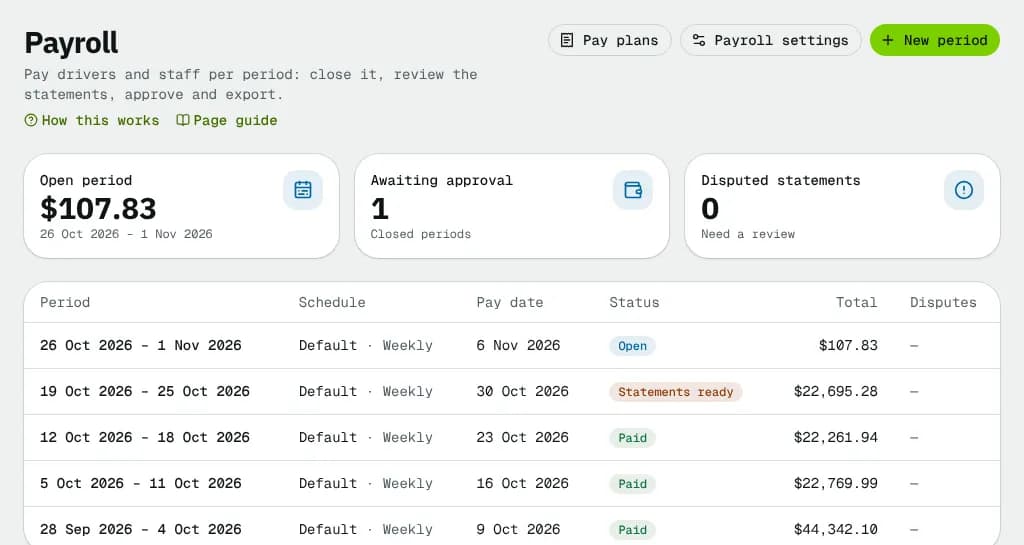
At a glance
| Area | What it shows or does |
|---|---|
| Header | Pay plans, Payroll settings, New period |
| Totals | Open period, Awaiting approval, Disputed statements |
| Pay periods table | Every period; click one to open it |
| Team pay this month | Staff on a staff pay plan and what they earned so far |
| Recurring adjustments | Deductions, allowances, escrow and the like booked every period |
| Payee companies | Companies paid for the drivers who work through them |
Header
| Button | What it does | Needs |
|---|---|---|
| Pay plans | Opens Pay plans | Payroll view |
| Payroll settings | Opens the settings dialog (below) | Viewing: payroll view; saving: payroll edit |
| New period | Opens New pay period | Payroll edit |
Totals
- Open period: the total earned so far in the open period, with its dates, or No open period.
- Awaiting approval: closed periods and periods with statements ready.
- Disputed statements: statements drivers disputed, across all periods (red when any).
The pay periods table
| Column | What it shows |
|---|---|
| Period | Start and end dates |
| Schedule | The pay schedule and its cycle (Weekly, Biweekly, Semi-monthly, Monthly) |
| Pay date | When the period is paid |
| Status | Open, Closed, Statements ready, Approved, Paid |
| Drivers / Staff | How many people earned in it |
| Lines | Number of earning lines |
| Total | Total pay, including registered contractors' sales tax once statements are generated (an open period shows earnings only) |
| Disputes | … disputed when statements are disputed |
No pay periods yet: a pay period groups earnings into statements, and nothing is collected until one exists. Create the first period opens the dialog.
New pay period
| Field | What to enter | Notes |
|---|---|---|
| Pay schedule | One of your schedules | The hint repeats its frequency and when periods start |
| Start date (optional) | Any day | Moved to the start of the schedule's period that contains it; the hint shows the resulting period. Empty = right after the schedule's latest period |
Click Create period; the new period opens.
Team pay this month
Dispatchers and other office staff with a staff pay plan, plus team members who handled orders without one (worth a plan). Columns: Team member, Plan (or No plan), Orders handled, Hours, Earned so far. With payroll edit rights: Log hours (when someone has a plan) and Staff plan (opens a new staff plan). Empty: No team member is paid through payroll yet.
Log hours: Team member, Day (not in the future), Hours and Note (optional). The hours are paid at the hourly rate of their staff plan and land in the open pay period for that day.
Recurring adjustments
Deductions, chargebacks, escrow, allowances and reimbursements for drivers and team members, booked into every pay period they overlap when the period closes. Each row shows who, the description, the type, the dates, the amount per period (or % of gross), Booked … of … when there is a target, and Ended or Stopped. Stop ends one now.
Add opens Add recurring adjustment:
| Field | What to enter | Notes |
|---|---|---|
| Who | A driver or team member | |
| Type | Reimbursement, Mileage, Allowance, Deduction, Chargeback, Escrow, Other | Mileage is not taxable (exported as a reimbursement); an allowance is taxable (exported with earnings) |
| Escrow | Hold (take off pay) or Release (pay back) | Escrow only |
| Order number | The order a chargeback is about | Chargeback only |
| How much | Fixed amount per period or Percent of gross pay | Gross = what was earned in the period, salary included, without tips, reimbursements or deductions. Pay carried in from an earlier period doesn't count |
| Amount per period ($) / Percent of gross … | The amount or % | |
| Pay until / Recover until / Hold until … | Optional total | Stops booking once reached; the last period books only what is left. 0 = until the end date |
| Description | For example "Phone allowance" | |
| Starts / Ends (optional) | Dates |
Lines already booked are never changed.
Payee companies
Companies paid for the drivers who work through them: their drivers' lines land on one company settlement, with GST/HST added when the company is registered. Add (or Edit on a company) opens the form: Company name, E-mail (optional) (settlements are e-mailed here), Address (optional), then the tax details:
| Field | Notes |
|---|---|
| Business / operating name (optional) | Shown on settlements |
| Tax ID type | None, EIN (US), Business number (Canada), Other |
| Business tax ID | Business numbers only, never a personal SIN or SSN |
| Year-end reporting form | None, 1099-NEC (US contractor), T4A (Canadian contractor), T4 (Canadian employee) |
| GST/HST number (optional) | For example 123456789 RT0001; GST/HST is added to the settlement |
| Province of supply | Its GST/HST rate applies |
| QST number (optional) | Québec registrants: QST is added on top of GST |
| Active | Inactive companies can't be picked for drivers (edit only) |
Pick the company as "Paid through company" on a driver's Compensation tab. A company with drivers can't be removed until they are moved.
Payroll settings
Four tabs; Save settings saves them all.
General
- Default pay cycle and Pay day: used only when no pay schedules exist.
- An order counts for the team member who…: Assigned it to a driver, Created the order, Dispatched it or Was the dispatcher when it was delivered. Used by staff plans that pay per order handled; each order counts once, on the day it is finished.
- E-mail statements when a period is approved: everyone with an e-mail address gets their statement PDF.
Pay schedules
Empty = one schedule from the default cycle and pay day. Each schedule has a Name, a Frequency (Weekly, Every two weeks, Twice a month (1st–15th, 16th–end), Monthly), Periods start on (weekday), A period starts in the week of (every two weeks: which fortnight), Periods start on day (monthly, 1–28), Pay day (The next weekday after the period with a Weekday, or A number of days after the period with Days after the period ends) and Pay day on a holiday (Pay the business day before or after; holidays come from the business calendar).
Hours
- Paid breaks: tick the break types (Lunch, Rest, Fuel stop, Vehicle maintenance, Personal, Other) that count as paid time on hourly pay; A rest break is paid up to (minutes) caps rest breaks.
- Overtime on hourly pay: Rule presets No overtime, Ontario: 1.5× over 44 h a week, Québec: 1.5× over 40 h a week, Alberta: 1.5× over 8 h a day / 44 h a week, British Columbia: 1.5× over 8 h a day / 40 h a week, 2× over 12 h a day, US federal (FLSA): 1.5× over 40 h a week, California: 1.5× over 8 h a day / 40 h a week, 2× over 12 h a day, or Custom: Overtime after (hours a day), Overtime after (hours a week), Double time after (hours a day), Overtime rate (×), Double time rate (×), Workweek starts on, and which employment types it applies to (contractors are usually not paid overtime). Presets are starting points: check them with your advisor.
- Hour limits: Hours a day and Hours a week; the roster warns when a driver is planned over them.
Exports
The QuickBooks payroll item each kind of pay line exports as (Regular pay, Overtime pay, Guarantee top-up, Bonus, Tips, Mileage reimbursement, Reimbursement, Deduction, Chargeback, Escrow, Other). Empty uses the default name.
Good to know
- Earnings land in a period only when it closes; until then the open period shows what has been earned so far.
- What a period goes through: The pay period page. Steps: Pay periods and statements.
Related articles
- How-toPay periods and statementsClose a pay period, review and fix driver and staff statements, approve, record the payment and export to your payroll system.
- How-toSet up driver pay plansBuild a pay plan from components and modifiers, pay different rates for own and company vehicles, try it in the simulator, assign it to groups of drivers and publish new versions.
- How-toPay dispatchers and office staffPay team members a salary per pay period, logged hours and a rate for every order they handle, with tiers, bonuses and their own statements.
- Page guidePay plansThe list of driver and staff pay plans, what each one pays, its current version and how many assignments it has.
- ConceptHow money moves in NemiRouteThe path of every dollar: an order's price and tax, the invoice, card, bank debit, manual and cash-on-delivery payments, credit, credit notes and refunds, statements and aging, and driver and staff pay from completed work.
Still stuck?
Tell us what you were trying to do. A person reads every message.