Location and battery settings
Which location permission to give, when NemiRoute shares your location, and how to keep Android from stopping it.
On this page
Dispatch and customers follow your delivery on the map, and arrival and proof checks need your position. This page explains what to allow and how to fix the warnings on Home.
Allow location
The first time the app needs your location it shows Location while you work: what is collected and when.
- Read the text and tap Continue.
- When the phone asks, choose While using the app and keep Precise on.
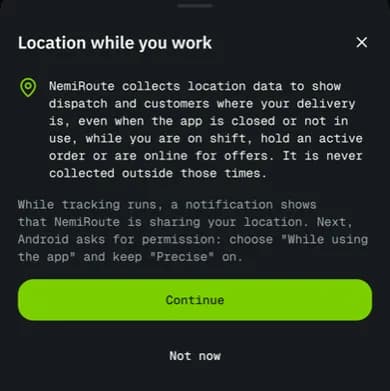
While using the app is enough. When you are working, the app runs a location service with a notification that says NemiRoute is sharing your location. It keeps sharing with the screen off or another app open. Allow all the time is optional; NemiRoute works without it.
To check or change the permission later, go to Profile > Location and privacy. The Permission status badge shows While using the app, Always allowed, Denied or Not asked yet, with a button to fix it.
Fix the warnings on Home
The chips under your name and the Needs attention list show problems the phone can fix:
| Warning | What to do |
|---|---|
| Location permission is off | Tap Turn on, then Continue and allow location. If the phone no longer asks, it opens Settings. |
| Location is off on this phone | Tap Open settings and switch location on (or use quick settings). |
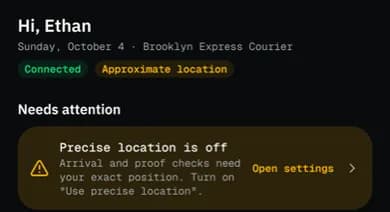
| Precise location is off (chip Approximate location) | Tap Open settings and turn on Use precise location. Arrival and proof checks need your exact position. |
| Battery saver can stop tracking | Tap Fix (see below). |
| Notifications are off (network drivers) | Tap Turn on. Without notifications you won't hear new offers or order changes while the app is closed. |
Stop the battery saver from pausing tracking
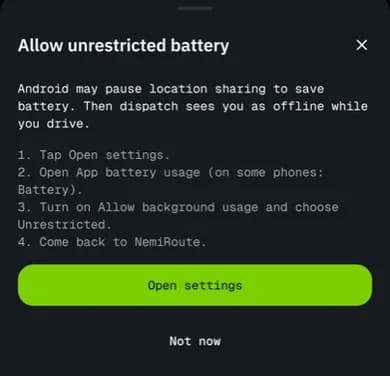
Android may pause location sharing to save battery. Dispatch then sees you as offline while you drive.
- On Home, tap Fix on Battery saver can stop tracking. The Allow unrestricted battery guide opens.
- Tap Open settings.
- Open App battery usage (on some phones: Battery).
- Turn on Allow background usage and choose Unrestricted.
- Come back to NemiRoute. The warning disappears.
After a restart or with location switched off
- If your phone restarts while you are on shift, the app cannot restart location sharing by itself. You get a notification You are still on shift: open NemiRoute to resume.
- If you switch location off during a shift, a Location is off notification reminds you that dispatch cannot see you.
- Signing out stops location sharing on this phone.
Related articles
- How-toComplete a deliveryTake an order from accept to delivered: navigate, arrive, collect proof (signature, photo, barcode, cash) and confirm.
- Page guideProfile tab and settingsThe driver app's Profile tab and every screen under it: contact details, documents, vehicles, notifications, Preferences, Location and privacy, Devices and sessions, Help, About, sign out and deleting your account.
- Page guideHome tabEvery card on the driver app's Home tab: status chips, Needs attention, the first-shift checklist, the Shift or Availability card, the next order, Today, notices, the next shift and the header.
- How-toWork a multi-stop jobFollow an order with extra pickups, drop-offs and a return: which stop is current, how to finish each one and what happens when a stop can't be completed.
Still stuck?
Ask your courier company: they can see your account. Or tell us what you were trying to do.