Install the app and sign in
Accept your invitation, install the NemiRoute driver app, sign in with your company ID and turn on fingerprint or face unlock.
On this page
Your company invites you by e-mail. You set a password once, then sign in with your company ID, e-mail and password. Independent drivers sign up themselves: see Drive for the network and take offers.
Accept your invitation
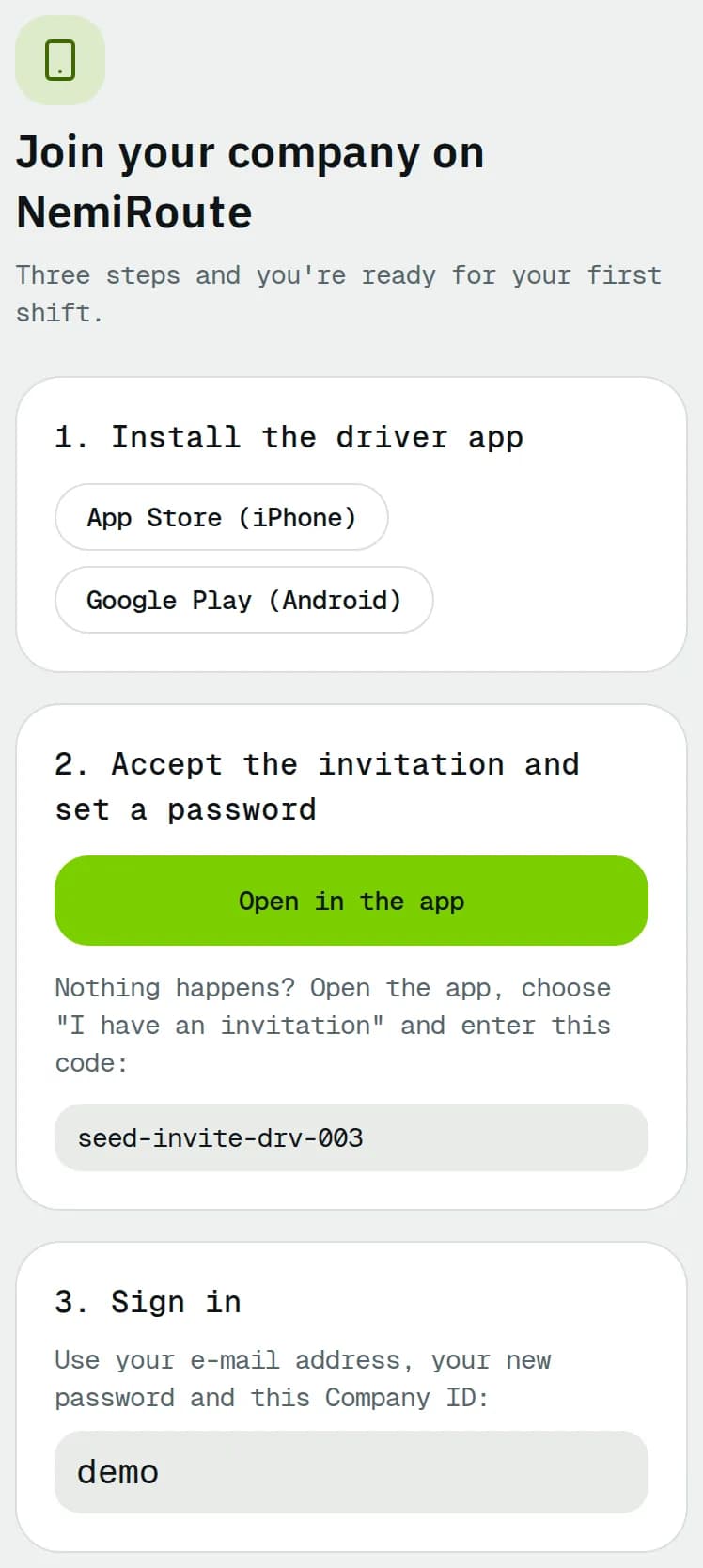
- Open the invitation e-mail on your phone and tap the link. The Join your company on NemiRoute page opens.
- Under 1. Install the driver app, tap App Store (iPhone) or Google Play (Android) and install the app.
- Come back to the page and tap Open in the app. The app opens on Accept invitation with your invitation code filled in.
- Enter a Password and type it again in Confirm password. The bar under it rates the password from Too short to Strong; it must be at least Fair: 8 or more characters with at least two of these: upper and lower case letters, a number, a symbol, 12 characters or more.
- Tap Join and sign in. You are signed in straight away.
Sign in
- Open the app. Keep Company driver selected at the top.
- Enter your Company ID. It is in your invitation e-mail and on the invitation page.
- Enter your Email and Password.
- Turn on Remember my email if you want the company ID and e-mail filled in next time.
- Tap Sign in.
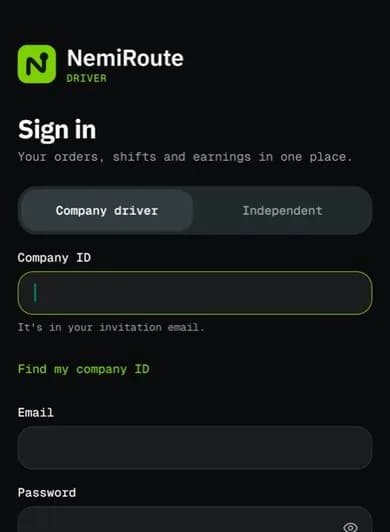
Independent network drivers tap Independent instead and leave out the company ID.
Lost the company ID? Tap Find my company ID, enter your e-mail and tap Email my company ID. If the e-mail belongs to a company driver, the ID arrives in your inbox.
If your company gave you a temporary password, the app asks you to Set a new password first: enter the Current password, a new one, and tap Save password.
Reset a forgotten password
- On the sign-in screen, tap Forgot password?.
- Enter your Company ID (optional) and Email, then tap Send code. A code only goes to an email with an active driver account. If none arrives and your company removed you as a driver, ask your company.
- Type the 6-digit code from the e-mail in Verification code and tap Verify. You can ask for a new code after 2 minutes with Resend code.
- Choose a New password you have not used before and tap Update password. Then sign in.
Unlock with fingerprint or face
Turn this on so nobody else can open the app on your phone.
- Go to Profile > Preferences.
- Under Security, turn on Unlock with fingerprint or face (on an iPhone Unlock with Face ID or Unlock with Touch ID) and confirm with your fingerprint or face.
The app then locks when you open it and after 2 minutes away. Tap Unlock, or Use password instead to sign in again. The switch is greyed out until you set up fingerprint or face unlock in your phone settings.
Related articles
- How-toClock in, take breaks and clock outStart your shift with the vehicle check, take breaks, and end the shift with the odometer reading.
- How-toDrive for the network and take offersApply as an independent network driver, go online in your zones, and accept or decline delivery offers before they expire.
- Page guideSign-in screensEvery field and button of the driver app's sign-in, Find my company ID, Accept invitation, Forgot password, Set a new password and Become a network driver screens, and the unlock screen.
- ConceptDriver app FAQShort answers to the questions drivers ask most: signing in, orders, proof, cash, offline work, location, pay and the network.
- ConceptDriver app glossaryThe words you meet in the driver app: order statuses, stops, proof, cash on delivery, shifts, offers, statements and network terms.
Still stuck?
Ask your courier company: they can see your account. Or tell us what you were trying to do.