Pending actions screen
How the driver app shows that it is offline, the sync chip, and every part of the Pending actions screen: statuses, Sync now, Retry, Discard and conflicts.
On this page
Steps you take without signal are saved on the phone and sent when the connection comes back. Pending actions lists what is still waiting and lets you retry or drop it. For what works offline and what doesn't, see Work without signal.
At a glance
| Where | What you see |
|---|---|
| Top of every screen | Offline · 2 pending. Changes sync when you reconnect. |
| Home | The chip No connection instead of Connected |
| Header, top left | The sync chip, for example 2 to sync; tap it to open Pending actions |
| After a saved step | Saved offline. Will sync when you are back online. |
| A locked order | Waiting to sync your last action. It will unlock when you are back online. |
The sync chip
| Chip | Meaning |
|---|---|
| 2 to sync / 2 actions waiting to sync | Saved actions not sent yet |
| Syncing... | Sending now |
| 1 needs attention | An action was rejected or hit a conflict |
The chip disappears when everything is sent.
Pending actions
The line at the top says You are offline. These actions are saved and will sync when you reconnect. or These actions have not been sent yet. Sync now sends everything (greyed out while offline).
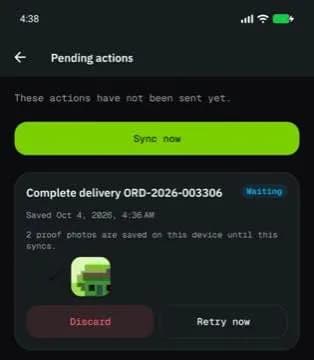
Each action shows what it was (for example Complete delivery OR-1042) and its status:
| Status | Meaning | Buttons |
|---|---|---|
| Waiting | Not sent yet | Retry now, Discard |
| Rejected | The server refused it; the reason is shown | Retry, Discard |
| Already changed | The order changed while you were offline (for example dispatch reassigned it); the card says what it is now (Status now: …) | Retry anyway, Keep latest version |
Actions with photos say how many proof photos are saved on the phone. Discarding one asks Discard this action? with Discard, keep photos or Discard and delete photos; Keep latest version asks Keep the latest version?. Action discarded confirms.
When nothing is waiting: All synced.
Good to know
- Each step counts at the time you did it, not when it synced.
- An order with a saved step is locked until it syncs, so the same step can't be done twice.
- Don't sign out or uninstall the app while actions are waiting: they live only on this phone.
Related articles
- How-toWork without signalWhat the driver app does offline, how saved actions sync later, and how to retry or discard one.
- How-toComplete a deliveryTake an order from accept to delivered: navigate, arrive, collect proof (signature, photo, barcode, cash) and confirm.
- How-toClock in, take breaks and clock outStart your shift with the vehicle check, take breaks, and end the shift with the odometer reading.
- How-toInstall the app and sign inAccept your invitation, install the NemiRoute driver app, sign in with your company ID and turn on fingerprint or face unlock.
Still stuck?
Ask your courier company: they can see your account. Or tell us what you were trying to do.